Close Menu
Gadget Guide News
  • Home
  • News
  • Features
  • Reviews
  • Best Stuff
  • Buying Guides
  • Deals

Subscribe to Updates

Get the latest tech news and updates directly to your inbox.

Trending

ChatGPT’s deep research tool adds a built-in document viewer so you can read its reports

February 11, 2026

A cheap Apple MacBook is on the way very soon

February 10, 2026

Fitbit’s AI health coach is now available on your iPhone

February 10, 2026
Facebook X (Twitter) Instagram
Gadget Guide News
Subscribe
  • Home
  • News
  • Features
  • Reviews
  • Best Stuff
  • Buying Guides
  • Deals
Gadget Guide News
  • Best Stuff
  • Buying Guides
  • Reviews
  • Deals
  • Features
Home»News»How to turn off Liquid Glass once you’ve upgraded your iPhone, iPad or Mac to iOS 26
News

How to turn off Liquid Glass once you’ve upgraded your iPhone, iPad or Mac to iOS 26

News RoomBy News RoomFebruary 10, 2026003 Mins Read
Share Facebook Twitter Pinterest Copy Link LinkedIn Tumblr Email Telegram WhatsApp
Follow Us
Google News Flipboard
Share
Facebook Twitter LinkedIn Pinterest Email Copy Link

It’s fair to say that Apple’s Liquid Glass design language hasn’t exactly been a roaring success. I think it’s absolutely fine on larger screens in fairness – I’ve got used to it on macOS 26 Tahoe for example and it’s not too invasive on iPadOS 26 either. And it’s essentially a relief that the latest version of the iPad software has finally nailed some decent multitasking features. The windowing feature works well.

But on the iPhone‘s smaller display, Liquid Glass is a different story for me and as I’ve said in reviews, some apps have become harder to use.

It’s hard to read text in the menu of the Apple Music interface while Safari’s address/search bar is not only small and hard to target properly but the text is also hard to read with the transparency. I found it so difficult in fact, that I just did what I thought I’d have done years ago and replaced Safari with Chrome on my iPhone’s home screen.

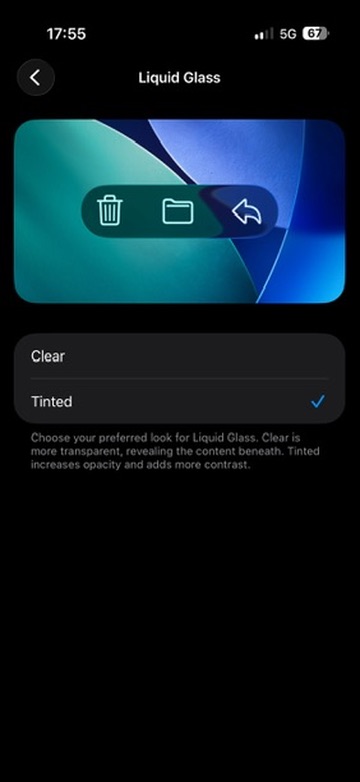
However, in the iOS 26.1 update (and later versions), Apple gives the option of reducing the effect of Liquid Glass with a new Liquid Glass toggle that enables you to reduce the level of transparency in Settings > Display & Brightness. An option now gives you the option to instead add a tint to elements, rather than making them almost see-through – the Liquid Glass default, called ‘Clear’ in the menu options.
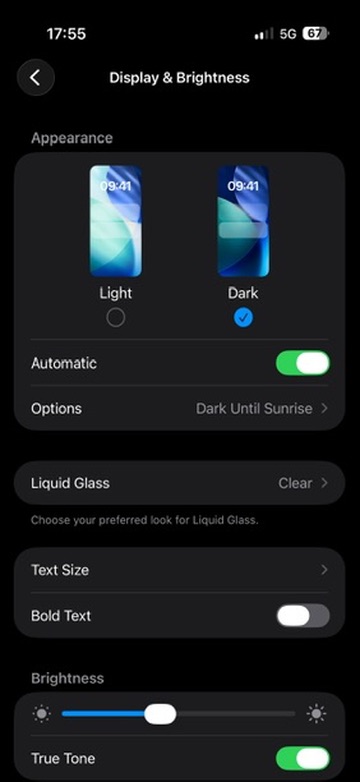
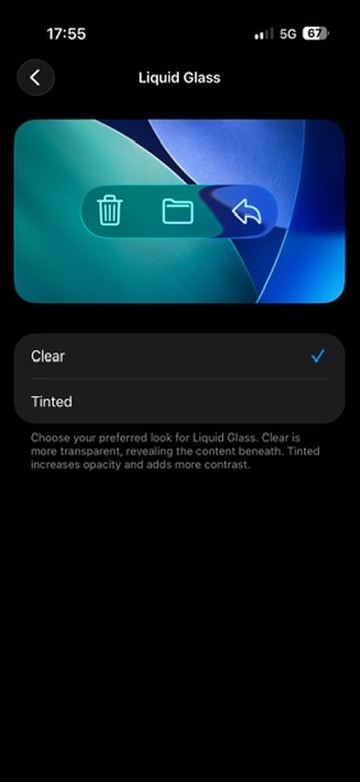
Liquid Glass options in iOS 26.1
Liquid Glass options in iOS 26.1Liquid Glass options in iOS 26.1

The description on the feature says: “Choose your preferred look for Liquid Glass. Clear is more transparent, revealing the content beneath. Tinted increases opacity and adds more contrast.”

So what’s it like? Well, it basically softens the effect. There’s still a hint of transparency, but it really is just a hint and elements are nearly opaque. It’s a lot better to use in my opinion and will probably assuage those who have made complaints.

As you might expect, the feature is also available in iPadOS 26.1 and later – again via Settings > Display & Brightness – as well as in macOS 26.1 and later via Settings > Appearance.
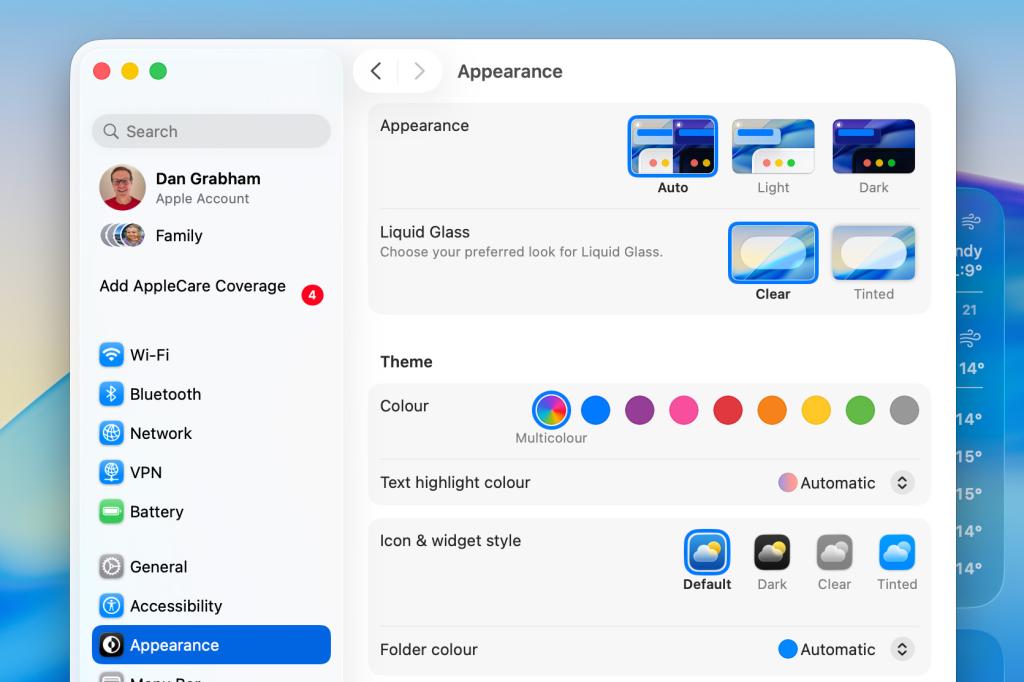
Liquid Glass toggle on macOS 26.1Liquid Glass toggle on macOS 26.1

All these features appear to be similar to the Accessibility setting called Reduce Transparency that has been present in earlier versions of iOS 26. This toggle says it will “improve contrast by reducing transparency and blurs on some backgrounds to increase legbility”.

In the updates it has released for iOS 26, Apple has also fixed the alarm screen while iPadOS 26.1 and later brought back the popular Slide Over multitasking feature for iPad users, having previously removed it.

Also don’t forget to check out some of our favourite iOS 26 tips and tricks including Call Screening, Hold Assist, polls in Messages and lots more.

  • Apple’s Liquid Glass looks like it’s beamed in from the movies. I don’t think that’s a good thing

Read the full article here

Follow on Google News Follow on Flipboard
Share. Facebook Twitter Pinterest LinkedIn Tumblr Email Copy Link
News Room
  • Website

Related Posts

ChatGPT’s deep research tool adds a built-in document viewer so you can read its reports

February 11, 2026

A cheap Apple MacBook is on the way very soon

February 10, 2026

Fitbit’s AI health coach is now available on your iPhone

February 10, 2026
Add A Comment
Leave A Reply Cancel Reply

Top Articles

This is the one thing you must not do with your new Nintendo Switch 2

December 25, 2025

Asus now claims it’s not dropping the RTX 5070 Ti amid memory shortages

January 16, 2026

Nintendo’s new Virtual Boy is more fun to look at than to play

February 5, 2026
Latest Reviews

GuliKit’s tiny dongle lets you connect a PS5 controller to your Switch 2

News RoomFebruary 8, 2026

Anker’s new 45-watt Nano charger has a screen and other upgrades. Here’s what it’s like

News RoomFebruary 7, 2026

Nintendo’s new Virtual Boy is more fun to look at than to play

News RoomFebruary 5, 2026

Subscribe to Updates

Get the latest tech news and updates directly to your inbox.

Demo
Most Popular

Naya Connect is a modular mechanical keyboard system for the indecisive

January 14, 2026

This is the one thing you must not do with your new Nintendo Switch 2

December 25, 2025

Asus now claims it’s not dropping the RTX 5070 Ti amid memory shortages

January 16, 2026
Our Picks

New Apple TV remote for Mac is a godsend for watching while you work

February 10, 2026

Discord says ‘vast majority’ of users won’t see its new age verification setup

February 10, 2026

YouTube Music making lyrics Premium is a rare win for people who pay

February 10, 2026

Subscribe to Updates

Get the latest tech news and updates directly to your inbox.

Facebook X (Twitter) Instagram Pinterest
  • Home
  • Privacy Policy
  • Terms of use
  • For Advertisers
  • Contact
2026 © Prices.com LLC. All Rights Reserved.

Type above and press Enter to search. Press Esc to cancel.