

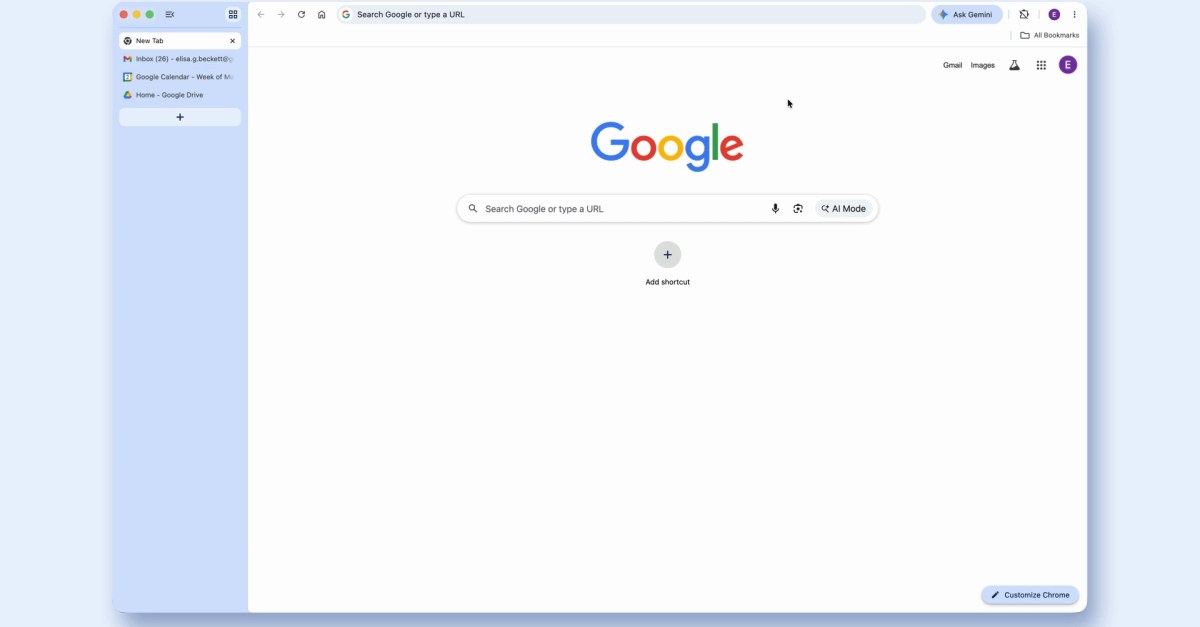
Google’s Chrome browser is getting a couple of new features, both of them extremely welcome and wildly overdue. The first is a reading mode, which does what it already does in most other browsers: strip out a lot of website cruft to make pages easier to read. Reading mode is good, you should use it, a lot of websites are bad. The second feature is the big one: vertical tabs. Instead of having all your tabs in a row across the top of your browser, you can now right-click on the tab bar and select “Show Tabs Vertically” to have them appear in a sidebar instead.
Vertical tabs are hardly a new idea about browsers — even the original Chrome team tested them, before deciding that putting the tabs at the top made each one feel more like an app. Glen Murphy, the team’s original designer, said in an interview last year that he saw tabs as “the equivalent of a window’s titlebar — the highest level element that could be detached, grouped, and would contain and separate each page and toolbar from each other.” Chrome stuck with that logic, and that design, for too many years afterward.
After all this time, Chrome actually executed the idea pretty well. When you switch to vertical tabs, the Chrome address bar moves up to the top row of the app, which makes the interface take up substantially less space than before. If you’re a real minimalist, you can shrink the sidebar to show only website favicons, and suddenly Chrome’s chrome is almost entirely out of the way.
(I say almost because Google could have gone further here. Over the last few years, browser after browser has essentially copied the design that The Browser Company built into Arc, which has a left sidebar that also includes bookmarks and the address bar. It looks better, and frees up even more space. Google being Google, though, there’s no chance Chrome is ever going to take the search bar — a portal to its unbelievably lucrative search engine, a product integration so powerful it became a central part of the search antitrust trial — out of focus.)
All of this is to say: Vertical tabs are better and you should use them. It’s a simple matter of screen real estate. Virtually every modern computer display is widescreen, which is to say it’s wider than it is tall. Websites and web apps, meanwhile, are practically always vertical experiences. Whether you’re on a 13-inch laptop or a 32-inch behemoth of a monitor, the space from top to bottom of your computer is more precious than the space from left to right.
Moving your tabs to the side also makes them much easier to manage. If I load 12 tabs on my 13-inch MacBook Air, I can see about three letters of each tab’s title; if I load 25 all I can see is the favicons. With vertical tabs on, though, I can see the full title of 23 tabs at a time, with the other two just a tiny scroll away. The more I’ve embraced vertical tabs, the more I’ve appreciated how much easier this makes it to find the tab I’m looking for, and to quickly close the ones I don’t want anymore. I don’t have to wonder which of those 12 tabs with a Google Docs icon is actually the doc I need, because all the names are right there.
Vertical tabs also make it easier to work with tab groups, another power-user favorite. You can now maintain a few groups, each of which expands and contracts in place without completely usurping all the space you need for your more ephemeral tabs.
The other reason to switch to vertical tabs is that it makes your browser work more like the other software you use. For better or worse, it seems most apps have arrived at the idea that there’s a sidebar on the left for navigating your stuff, and then a main window for your content. There are a few holdouts, most notably Microsoft’s Office suite and Google Workspace, both of which still favor a horizontal toolbar at the top of the page, but I’m not sure I’d call either of those paragons of modern software design. Most modern software, from Notion to Slack to Canva, has long since embraced the sidebar. Since our browsers now are primarily just windows through which we access web apps, it only makes sense for them to look and work the same way.
The good news here is, you don’t have to take my word for it. Switching browsers is hard, and maybe you don’t want to do it just for vertical tabs. But update Chrome, right-click the tab bar, and just see what happens when you select Show Tabs Vertically. I bet you’ll never go back.
Read the full article here
