
Close Menu
Gadget Guide News
  • Home
  • News
  • Features
  • Reviews
  • Best Stuff
  • Buying Guides
  • Deals

Subscribe to Updates

Get the latest tech news and updates directly to your inbox.

Trending

The race to AGI-pill the pope

December 1, 2025

Soundcore’s Space One headphones are a Cyber Monday steal at just $68

December 1, 2025

Apple’s M2 MacBook Air is just $599 during Cyber Monday

December 1, 2025
Facebook X (Twitter) Instagram
Gadget Guide News
Subscribe
  • Home
  • News
  • Features
  • Reviews
  • Best Stuff
  • Buying Guides
  • Deals
Gadget Guide News
  • Best Stuff
  • Buying Guides
  • Reviews
  • Deals
  • Features
Home»News»A bizarre Windows 11 bug duplicates Task Manager instead of closing it
News

A bizarre Windows 11 bug duplicates Task Manager instead of closing it

News RoomBy News RoomOctober 31, 2025012 Mins Read
Share Facebook Twitter Pinterest Copy Link LinkedIn Tumblr Email Telegram WhatsApp
Follow Us
Google News Flipboard
Share
Facebook Twitter LinkedIn Pinterest Email Copy Link

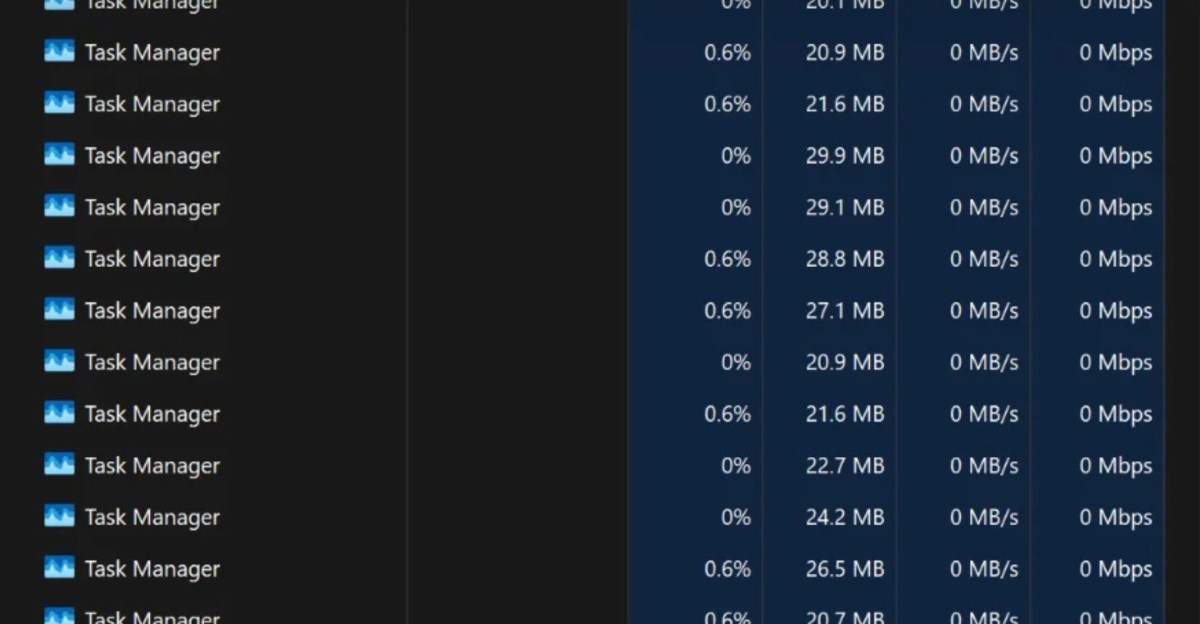
If you’re a Windows 11 user who frequently uses the Task Manager tool, you should probably avoid Microsoft’s latest OS update. Reddit users and my colleague Tom Warren are reporting that a bug in the optional Windows 11 KB5067036 update is causing Task Manager to duplicate itself when they attempt to close the app, impacting computer performance.

The bug is breaking the “X” button to quit Task Manager, preventing the app from shutting down and instead keeping it running in the background. Repeated attempts to open and close the app result in multiple instances that can eat up your CPU and RAM resources.

According to the KB5067036 change log notes, the update includes a fix for Task Manager that resolves some apps not being grouped with their processes, but mentions no other Task Manager changes. Microsoft hasn’t acknowledged this new bug at the time of writing, and the KB5067036 log still says that the company “is not currently aware of any issues with this update.”

We have reached out to Microsoft for further information.

Thankfully, Windows Latest and Reddit user BNSoul have found a temporary workaround. Individual Task Manager instances can be closed by selecting the “End task” button on the app instead of clicking the “X” button, or users can run taskkill /im taskmgr.exe /f in the Windows 11 Command Prompt to shut down all of the Task Manager instances simultaneously.

Read the full article here

Follow on Google News Follow on Flipboard
Share. Facebook Twitter Pinterest LinkedIn Tumblr Email Copy Link
News Room
  • Website

Related Posts

The race to AGI-pill the pope

December 1, 2025

Soundcore’s Space One headphones are a Cyber Monday steal at just $68

December 1, 2025

Apple’s M2 MacBook Air is just $599 during Cyber Monday

December 1, 2025
Add A Comment
Leave A Reply Cancel Reply

Top Articles

A bundle with Amazon’s biggest smart display and a stand just got its biggest discount

October 3, 2025

The OnePlus 15 is the phone to buy if you hate charging your phone

November 13, 2025

Kodak’s has ‘new’ 35mm film on the market – here’s why it’s a big deal

October 3, 2025
Latest Reviews

Rivian’s software-powered e-bike won me over with its adaptability 

News RoomNovember 28, 2025

Arturia’s AstroLab 37 crams 44 synths into a tiny keyboard

News RoomNovember 25, 2025

The 5 best noise-canceling headphones of 2025

News RoomNovember 25, 2025

Subscribe to Updates

Get the latest tech news and updates directly to your inbox.

Demo
Most Popular

Pixel Airdropping to iPhones, Macs, and iPads works great

November 21, 2025

A bundle with Amazon’s biggest smart display and a stand just got its biggest discount

October 3, 2025

The OnePlus 15 is the phone to buy if you hate charging your phone

November 13, 2025
Our Picks

Netflix kills casting from phones

December 1, 2025

These great Cyber Monday tech deals will likely be gone tomorrow

December 1, 2025

Anker’s Laptop Power Bank is $32 off for Cyber Monday, its biggest discount yet

December 1, 2025

Subscribe to Updates

Get the latest tech news and updates directly to your inbox.

Facebook X (Twitter) Instagram Pinterest
  • Home
  • Privacy Policy
  • Terms of use
  • For Advertisers
  • Contact
2025 © Prices.com LLC. All Rights Reserved.

Type above and press Enter to search. Press Esc to cancel.