
Close Menu
Gadget Guide News
  • Home
  • News
  • Features
  • Reviews
  • Best Stuff
  • Buying Guides
  • Deals

Subscribe to Updates

Get the latest tech news and updates directly to your inbox.

Trending

The race to AGI-pill the pope

December 1, 2025

Soundcore’s Space One headphones are a Cyber Monday steal at just $68

December 1, 2025

Apple’s M2 MacBook Air is just $599 during Cyber Monday

December 1, 2025
Facebook X (Twitter) Instagram
Gadget Guide News
Subscribe
  • Home
  • News
  • Features
  • Reviews
  • Best Stuff
  • Buying Guides
  • Deals
Gadget Guide News
  • Best Stuff
  • Buying Guides
  • Reviews
  • Deals
  • Features
Home»News»Apple adds a new toggle to make Liquid Glass less glassy
News

Apple adds a new toggle to make Liquid Glass less glassy

News RoomBy News RoomOctober 20, 2025022 Mins Read
Share Facebook Twitter Pinterest Copy Link LinkedIn Tumblr Email Telegram WhatsApp
Follow Us
Google News Flipboard
Share
Facebook Twitter LinkedIn Pinterest Email Copy Link

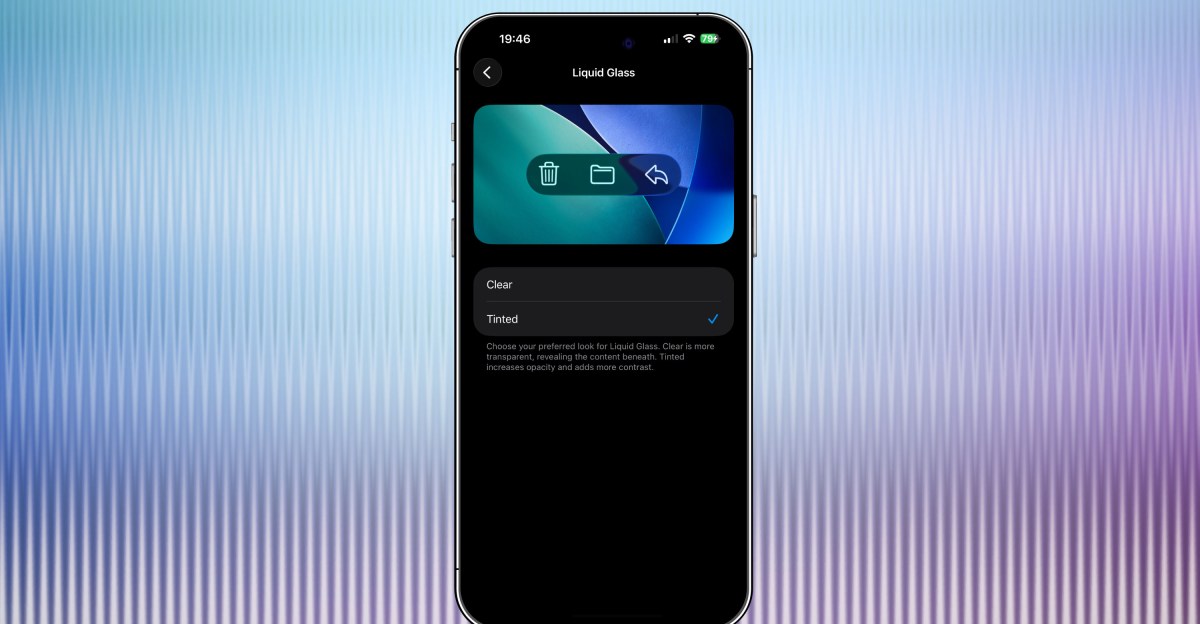
Apple’s latest iOS 26.1 beta has a new option that lets you tint Liquid Glass elements of iOS 26 so that they are more opaque. Since announcing Liquid Glass at WWDC this year, Apple has tweaked exactly how glassy Liquid Glass is — early on, there were some legibility issues — but this new setting gives you the choice of making things more transparent or more frosted.

The option is available now in the iOS 26.1 developer beta that Apple launched on Monday. You can access it from Settings > Display & Brightness > Liquid Glass, where you can choose between “Clear” and “Tinted.” The latest iPadOS 26.1 and macOS 26.1 developer betas also let you tint Liquid Glass, MacRumors reports.

Here’s a few image sliders showing how things look with the clear or tinted Liquid Glass. For each one, the screenshot on the left features the app with the “Clear” Liquid Glass option while the screenshot on the right uses the “Tinted” one. The differences are subtle, but I much prefer the Tinted versions.

The Liquid Glass toggle isn’t the only handy new option Apple added with the newest iOS 26.1 beta. The update also lets you turn off the ability to swipe to the camera from the lock screen, which might prevent people who have your phone from taking pictures even if they can’t bypass your lock screen. You can access the toggle from Settings > Camera > Lock Screen Swipe to Open Camera.

Read the full article here

Follow on Google News Follow on Flipboard
Share. Facebook Twitter Pinterest LinkedIn Tumblr Email Copy Link
News Room
  • Website

Related Posts

The race to AGI-pill the pope

December 1, 2025

Soundcore’s Space One headphones are a Cyber Monday steal at just $68

December 1, 2025

Apple’s M2 MacBook Air is just $599 during Cyber Monday

December 1, 2025
Add A Comment
Leave A Reply Cancel Reply

Top Articles

A bundle with Amazon’s biggest smart display and a stand just got its biggest discount

October 3, 2025

The OnePlus 15 is the phone to buy if you hate charging your phone

November 13, 2025

Kodak’s has ‘new’ 35mm film on the market – here’s why it’s a big deal

October 3, 2025
Latest Reviews

Rivian’s software-powered e-bike won me over with its adaptability 

News RoomNovember 28, 2025

Arturia’s AstroLab 37 crams 44 synths into a tiny keyboard

News RoomNovember 25, 2025

The 5 best noise-canceling headphones of 2025

News RoomNovember 25, 2025

Subscribe to Updates

Get the latest tech news and updates directly to your inbox.

Demo
Most Popular

Pixel Airdropping to iPhones, Macs, and iPads works great

November 21, 2025

A bundle with Amazon’s biggest smart display and a stand just got its biggest discount

October 3, 2025

The OnePlus 15 is the phone to buy if you hate charging your phone

November 13, 2025
Our Picks

Netflix kills casting from phones

December 1, 2025

These great Cyber Monday tech deals will likely be gone tomorrow

December 1, 2025

Anker’s Laptop Power Bank is $32 off for Cyber Monday, its biggest discount yet

December 1, 2025

Subscribe to Updates

Get the latest tech news and updates directly to your inbox.

Facebook X (Twitter) Instagram Pinterest
  • Home
  • Privacy Policy
  • Terms of use
  • For Advertisers
  • Contact
2025 © Prices.com LLC. All Rights Reserved.

Type above and press Enter to search. Press Esc to cancel.