

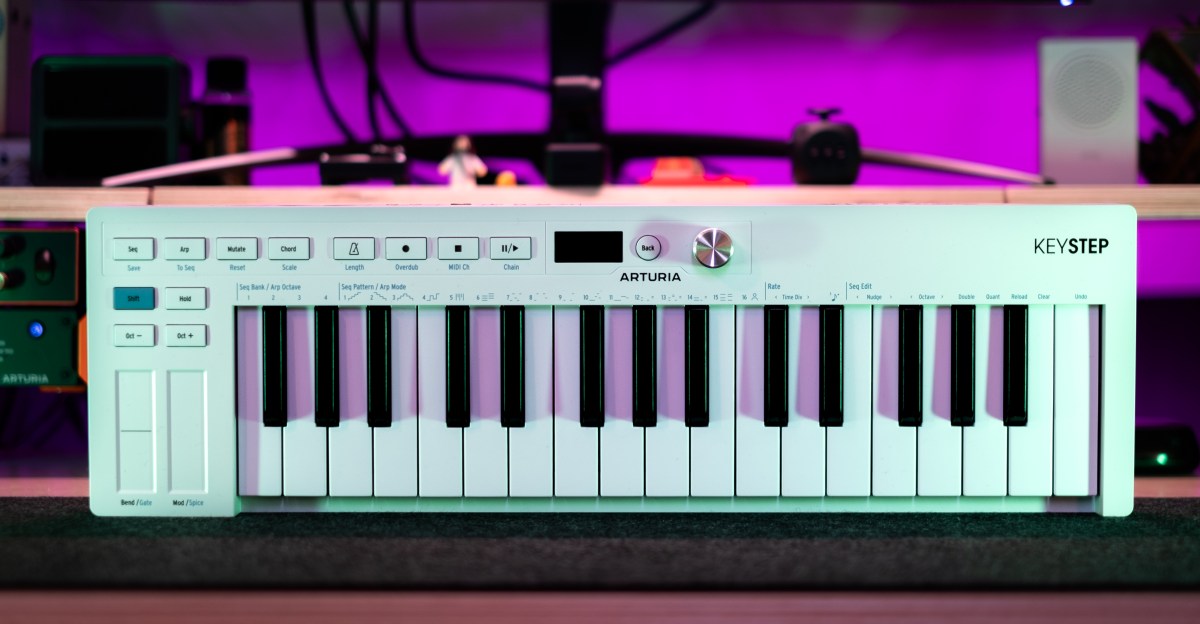
Arturia’s KeyStep is one of the most popular MIDI controllers ever made, especially with modular synth users and the DAWless crowd. It’s small, cheap, has an easy-to-use sequencer, and offers decent connectivity. But it was also released way back in January of 2016. The world of music gear moves more slowly than, say, smartphones, but Arturia has several controllers released after the KeyStep that are already on their third generation. The $139 KeyStep mk2 takes this classic and updates it with a host of new sequencing and composition features developed by Arturia over the years.
Compared to the original, the KeyStep mk2 has double the number of arpeggiator modes (16), eight times as many sequencer save slots (64), generative sequencing features, a chord mode, and a scale mode. Scale mode can be handy for those of us who are less-skilled players by ensuring every note is in key. But I’ve always found it a bit unnatural feeling on a traditional keyboard. (Though it’s my preferred layout on a pad controller.)
The more exciting things to me are the new arpeggiator modes, the Spice and Mutate generative features, and the way they interact with the sequencer. When I’m feeling stuck or uninspired (which is often these days), they offer a shortcut to idea generation that goes beyond just randomly spitting out notes.
So much of any creative act is about getting into a flow state, but that takes time. You don’t just sit down and immediately enter a state of flow. You need to find it. And when your time is limited because of a demanding job or kids, it can be difficult to find. The generative and iterative features of the KeyStep make it easier to get over that initial hump when I’m sitting down to make some music.
Often, I’ll start by playing a simple arp. I’ll pick a chord — just three or four notes, usually, nothing wild. Then I’ll press the mutate button. This starts shifting the notes around, adding octave jumps and rests, generally just introducing a little chaos. A quick press adds just a dash of randomness, while holding it down for longer can change your original arpeggio into something completely unrecognizable.
I’ll generally do this a few times until I find something I like. Then I’ll dial in the Spice value. This is another generative feature, which changes the gate length of notes and adds ratchets. If Spice isn’t doing anything interesting to my ear, I’ll roll the dice by holding shift and tapping the Spice touchstrip three times. This “rolls” a new set of random changes for me to dial in using the Spice parameter.
Once I have a short phrase I like, I can then save it to the sequencer, and this is where things get more interesting. I can duplicate the phrase, extending the sequence to 32 or even 64 steps. And, since the KeyStep’s sequencer is polyphonic, I can record overdubs, playing counter melodies, chords, or basslines alongside this semi-random sequence.
I might quickly press the Mutate button again here or fine-tune the Spice setting, but once I have a fuller-sounding passage I like, I can pass it back to the arpeggiator by selecting the “user sequence” arp mode. This uses the last sequence loaded as the basis for your arpeggio. It doesn’t just play the notes, though. It maps the sequence’s pattern onto whatever notes you play. If you play the same notes, it will sound the same, but it’s much more fun to play entirely new chords or a chord progression. If you have a chord progression for a song, but feel like it sounds a bit lifeless, this could be a great way to liven it up.
Now, when I’m feeling stuck, I don’t waste 30 minutes noodling and scrolling through presets or feeling discouraged because my drum pattern is too boring. I just start playing. The point isn’t even necessarily to use whatever sequence or arp I play on the KeyStep, though I often do. Instead, it’s just about making something — anything — and seeing where my creative impulses take me next.
Arturia smartly kept the price and basic design more or less the same — 32 keys in a shallow body with minimal hands-on controls. But there are some obvious differences. The knobs and switch for controlling the sequencer and arpeggiator have been replaced with some lightly clicky buttons, and there’s now an endless encoder and a small OLED in the middle of the keyboard.
Physically, the biggest change is to the build quality, and it’s not a good thing. While the KeyStep mk2 doesn’t feel cheap, it’s certainly not up to the standards of the original. The OG KeyStep had a metal base. It was much heavier than you’d expect from looking at it, and it felt like it could not only endure the rigors of tour life, but also be used as a self-defense weapon. The mk2 trades the metal base for plastic, and the controls just feel less solid overall.
That’s my only real complaint, though.
The KeyStep mk2 isn’t a magic bullet that will cure your writer’s block or put you in a flow state immediately. But it’s already proven to be a handy tool when I’m feeling discouraged or uninspired while staring at a blank Ableton Live session.
Read the full article here
