Close Menu
Gadget Guide News
  • Home
  • News
  • Features
  • Reviews
  • Best Stuff
  • Buying Guides
  • Deals
  • More Articles

Subscribe to Updates

Get the latest tech news and updates directly to your inbox.

Trending

Fitbit Air Pokémon special edition will have the kids going to bed willingly and sleeping in on weekends

August 28, 2026

The Samsung Odyssey G6 has a refresh rate that’s more insane than we thought – a new image every millisecond

August 28, 2026

Apple TV’s sci-fi thriller Dark Matter gets even trippier in season 2

August 28, 2026
Facebook X (Twitter) Instagram
Gadget Guide News
Subscribe
  • Home
  • News
  • Features
  • Reviews
  • Best Stuff
  • Buying Guides
  • Deals
  • More Articles
Gadget Guide News
  • Best Stuff
  • Buying Guides
  • Reviews
  • Deals
  • Features
Home»Reviews»Even with some limitations, I’m convinced the Dell XPS 13 (2026) has rewritten the rules for affordable Windows laptops
Reviews

Even with some limitations, I’m convinced the Dell XPS 13 (2026) has rewritten the rules for affordable Windows laptops

News RoomBy News RoomAugust 28, 2026019 Mins Read
Share Facebook Twitter Pinterest Copy Link LinkedIn Tumblr Email Telegram WhatsApp
Follow Us
Google News Flipboard
Share
Facebook Twitter LinkedIn Pinterest Email Copy Link

Introduction

I must have said the phrase “hold on, this costs how much?” more times than I can count this year, but rarely for good reasons. Dell, on the other hand, has managed to buck the trend for ever-increasing prices and AI-inflicted inflation with what might be the Windows laptop steal of the century – if you’re in the USA and/or in education, anyway.

The new XPS 13 can currently be snapped up for just $599 in the US if you can prove you’re a student or teacher – and even if you’re not the $699 starting price still buys you an awful lot, including a sleek all-metal chassis, high resolution touchscreen and impeccable battery life. As responses to Apple’s surprisingly affordable MacBook Neo go, it’s an undeniably strong one.

There are a few compromises, of course: just 8GB of memory as standard, an Intel CPU that’s hardly a speed demon, and limited connectivity. Prices aren’t quite as rosy in the UK either, with students set to pay £699 and everyone else £899 – although at the time of writing, a deal has brought that down to a more tempting £769. But after using one every day for the last month, I’m still convinced the new XPS 13 raises the bar for sensibly-priced Windows ultraportables.

How does the XPS 13 stick to the series’ styling – and where does it differ?

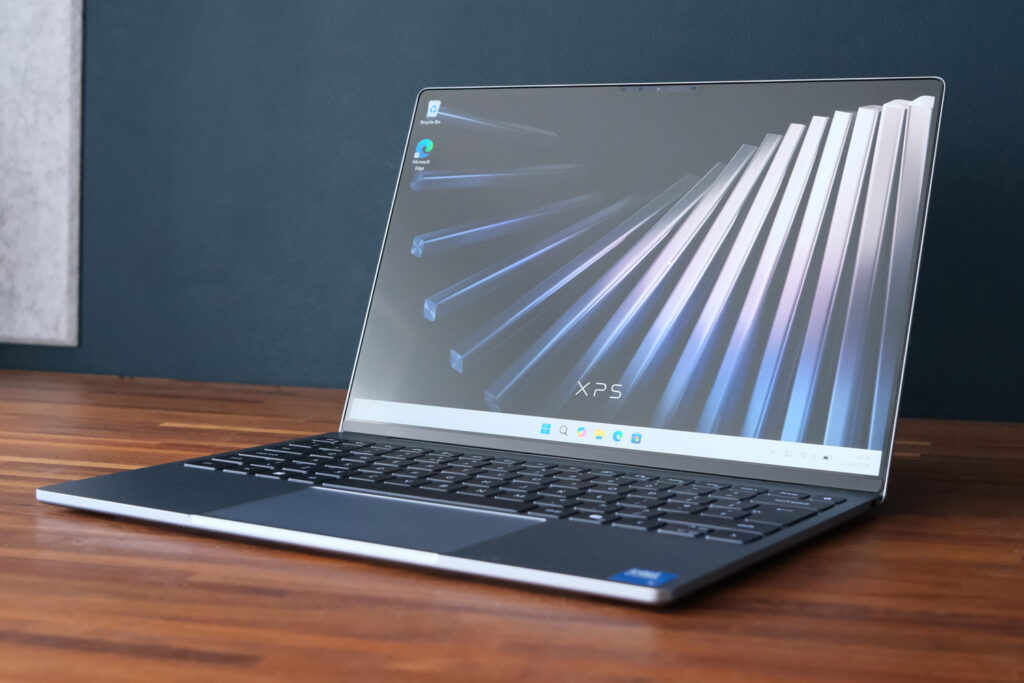
By dropping just a few of the major XPS design beats that would otherwise knock it out of budget territory, Dell has managed to make the XPS 13 feel like the sort of machine you’d normally spend north of four figures to own. The chassis is machined aluminium – not the metal-meets-plastic that’s the norm at this price range – with a satin finish that seems to actively repel fingerprints.

With just a stylised XPS logo on the lid, neatly rounded edges and an impressive 12.7mm thickness, I put it up there with the latest MacBook Air for looks. It even has a similar lip that makes opening the screen one-handed a breeze – something the earlier XPS 14 and XPS 16 lack.

You don’t get quite as many distinctive colour choices as the MacBook Neo, but my Sky review unit’s light blue tone is still a lot more interesting than boring old black. The other option, Storm, is a more traditional silver.

Connectivity has been stripped to the essentials here, with just one 10Gbps USB-C port on either side of the machine. They’re good for power delivery, data transfer and monitor output using DisplayPort Alt mode, which should cover most bases. The Core Ultra-equipped variants due later down the line will also bring speedier Thunderbolt 4 to the mix.

Would having HDMI and USB-A save me from bringing a dongle whenever I leave the house? Sure – but I wouldn’t call it a deal-breaker. Neither is the lack of 3.5mm headphone port, as I almost exclusively listen wirelessly while working remotely. It’s not like I’d struggle to make room in my travel bag, as the power brick is impressively dinky, being no larger than a smartphone charger yet able to deliver 65W.

A fingerprint sensor would’ve been nice, but the webcam supports Windows Hello facial recognition for quick logins. It’s also a 1080p unit, rather than the lowly 720p types you usually get in mid-range machines.

What are the XPS 13’s keyboard and touchpad like to work on?

Dell XPS 13 2026 review keyboard

The XPS 13’s island-style keyboard is the biggest area I’m glad Dell didn’t try to fully mimic the pricier XPS 14 and XPS 16. Those laptops have edge-to-edge key caps that I found finicky to type on, but here there’s a nice amount of room between each one. That hasn’t required much use of shrunken keys either, with half-height up and down arrows the only concession. The function row being slightly shorter than usual never proved a problem.

Dell gets a big thumbs up for including backlit keys, too. It’s something you don’t get on the MacBook Neo. Each key is evenly lit with white light that doesn’t shine too prominently around the edges.

I found it perfectly comfortable to type on, hitting my usual word-per-minute average in no time at all. There’s not a huge amount of key travel but they quickly bounce back into place and the keyboard tray doesn’t wobble or rattle a jot while under pressure.

The XPS 14’s expansive, all-glass haptic touchpad is also gone, in favour of a more traditional one with physical clicks. It’s immediately obvious where the surface begins and ends, there’s still enough room for multi-touch gestures, and tracking is perfectly accurate.

Has Dell skimped on the screen or speakers?

Dell XPS 13 2026 review display 1

On paper, the XPS 13 is rocking a display from the class above. The 13.4in panel’s 2560×1600 resolution and 120Hz refresh rate are several steps ahead of 1080p rivals in terms of clarity and motion smoothness. Pixel density is roughly on par with the MacBook Neo, but Apple’s laptop makes do with a more basic 60Hz panel. Text and images look wonderfully sharp, while scrolling is stutter-free.

It’s also touch-sensitive; while I rarely find reasons to prod Windows 11 on a laptop, I know others love having the option, and it’s a rare one among budget-minded laptops.

Dell has used an LCD panel, so contrast and black levels aren’t going to rival those of OLED alternatives, but I still thought colours had a good amount of punch and viewing angles were pretty decent too. Both sRGB and DCI-P3 coverage are excellent. This isn’t a machine for creative pros, so accuracy isn’t crucial, but the factory calibration gave me little reason to grumble.

Crank the brightness right up and the XPS 13 puts in a decent showing, hovering around 450 nits. To my eye it got significantly dimmer than I’d expect at 50%, so I largely stuck to 70-80% of the maximum for daytime working for best visibility. The matte panel finish helped keep reflections in check, which was handy as there’s not a huge amount of tilt on offer.

I was rather impressed by the punchy speakers, which might not have much in the way of bass but don’t sound overly tinny and produce plenty of volume. I rarely pushed beyond 50%.

Can the XPS 13 keep up on performance and battery life?

If you’ve been waiting for some kind of “gotcha” moment as to why the XPS 13 costs what it does, this is as close as you’ll get. Dell has gone for a Core 5 320 processor – Intel’s ‘everyday computing’ silicon aimed at entry-level systems – and paired it with 8GB of system memory. I genuinely can’t remember the last time I tested a Windows laptop with less than 16GB.

With two performance cores that can boost to 4.6GHz when needed and four Low-Power Efficient cores the CPU is no slouch, but being based on the efficiency-minded Wildcat Lake chip architecture rather than the more potent Panther Lake means no multi-threading and a lower class of integrated graphics.

In synthetic tests, that means the XPS 13 is largely on par with the MacBook Neo’s Apple A18 Pro silicon. I found there was oomph for writing, web browsing with just a few tabs open, video streaming and the like – as long as I largely stuck to one of them at a time. It gets outmuscled by similarly-priced machines with Intel’s Core Ultra 7 and those with Snapdragon X Plus internals though, so shouldn’t be your first choice for a go-anywhere machine that can also churn through 4K video edits.

Dell XPS 13 (2026) benchmarks
Geekbench 7 single-core 1785
Geekbench 7 multi-core 5877
Geekbench AI 3849
Speedometer 3.1 23.3

If you’re going to game on this laptop, make sure it’s minimally demanding indie or 2D fare, as the GPU can’t deliver smooth frame rates in modern 3D titles.

More importantly, certain apps and benchmarks either complain about being forced to run with only 8GB of RAM – or simply won’t start at all. Windows 11 really expects 16GB as standard now; my review unit was eating 5.8GB simply sitting on the desktop, leaving surprisingly little for software. Photoshop threw up a warning about available system resources when editing very large files. I could still crop and resize the photos seen in this review, but not at the pace a more powerful laptop could manage. Having 10+ Chrome tabs open at once made the whole OS feel rather sluggish.

I don’t think that will be a dealbreaker for students or anyone after a laptop for simple tasks, though – especially once you realise how long you’re able to go between charges. Playing a video file on loop at 50% screen brightness, I saw close to 20 hours before the battery called it a day. In more real-world tests, I was seeing north of 15 hours of Wi-Fi working. That’s more than enough to make it through entire school days without having to hunt down a mains socket. Dell has comfortably beaten the MacBook Neo here.

Standby battery life if phenomenal too. I left it for three days and barely saw a dip from when I last used it.

Should you buy the Dell XPS 13 in 2026?

Dell XPS 13 2026 review verdict

In case I hadn’t made it clear already, the XPS 13 is the best sensibly-priced Windows laptop you can buy right now. It looks and feels like a far more expensive machine, with a sharp, high refresh rate screen and comfy keyboard that make it a joy to use. Battery life is outstanding and it navigates basic desktop duties without complaint.

The 8GB base model quickly reveals its limits when you push harder with more demanding apps, though. While Dell has swallowed the skyrocketing cost of flash memory as much as it can, once a customer doubles the RAM the XPS 13 gets pushed into more hotly contested territory – particularly in the UK. Rivals like the HP OmniBook 5 NGAI 14 and Snapdragon-powered Asus Zenbook A14 aren’t quite as slim or sleek, but they have more powerful internals and greater connectivity.

Those that need more grunt will either have to consider shopping around, accept they’ll have to pay Dell the extra for 16GB of RAM, or wait until the Core Ultra-powered models arrive later.

Yet for homework, web browsing and after-hours streaming sessions, there’s little else I’d pick for the cash in the USA – and temporary price cuts have added to its appeal in the UK too. It also has enough of a spec lead over the MacBook Neo (including double the base storage) to deserve a spot on shortlists no matter where you live.

What are the Dell XPS 13 (2026)’s technical specifications?

Dell XPS 13 (2026)
Screen 13.4in, 2560×1600, 30-120Hz LCD
CPU Intel Core 5 320
Memory 8GB RAM
Graphics Intel (integrated)
Storage 512GB SSD
Operating system Windows 11
Connectivity 2x USB-C
Battery 52Whr
Dimensions 298x201x12.7mm, 1kg

google preferred source

Apple News

Read the full article here

Follow on Google News Follow on Flipboard
Share. Facebook Twitter Pinterest LinkedIn Tumblr Email Copy Link
News Room
  • Website

Related Posts

The second-generation Bose QuietComfort Headphones are good, but don’t stand out

August 26, 2026

GuliKit’s Switch 2 TV dock gives me one feature I’ve missed when traveling

August 25, 2026

Greenworks’ MaximusZ electric riding mower has five motors and a few compromises

August 25, 2026
Add A Comment
Leave A Reply Cancel Reply

Top Articles

What to expect from Apple’s September event: iPhone Fold, iPhone 18 Pro, Apple Watch Ultra 4 and more

July 4, 2026

We’ve reviewed the best tablets in 2026 – including iPad and Android picks for every budget

July 6, 2026

Swatch posts the correct answers to the MoonSwatch Mission to Moon 1969 ESTA quiz – did you pass?

July 23, 2026
Latest Reviews

Even with some limitations, I’m convinced the Dell XPS 13 (2026) has rewritten the rules for affordable Windows laptops

News RoomAugust 28, 2026

The second-generation Bose QuietComfort Headphones are good, but don’t stand out

News RoomAugust 26, 2026

GuliKit’s Switch 2 TV dock gives me one feature I’ve missed when traveling

News RoomAugust 25, 2026

Subscribe to Updates

Get the latest tech news and updates directly to your inbox.

Demo
Most Popular

You can now try Apple’s all-new Siri AI yourself on your iPhone, iPad or Mac – here’s how

July 13, 2026

What to expect from Apple’s September event: iPhone Fold, iPhone 18 Pro, Apple Watch Ultra 4 and more

July 4, 2026

We’ve reviewed the best tablets in 2026 – including iPad and Android picks for every budget

July 6, 2026
Our Picks

Even with some limitations, I’m convinced the Dell XPS 13 (2026) has rewritten the rules for affordable Windows laptops

August 28, 2026

Meta addresses ‘pervert glasses’ reputation with a privacy fix and a new marketing campaign

August 27, 2026

Who really runs OpenAI now?

August 27, 2026

Subscribe to Updates

Get the latest tech news and updates directly to your inbox.

Facebook X (Twitter) Instagram Pinterest
  • Home
  • Privacy Policy
  • Terms of use
  • For Advertisers
  • Contact
2026 © Prices.com LLC. All Rights Reserved.

Type above and press Enter to search. Press Esc to cancel.