Close Menu
Gadget Guide News
  • Home
  • News
  • Features
  • Reviews
  • Best Stuff
  • Buying Guides
  • Deals
  • More Articles

Subscribe to Updates

Get the latest tech news and updates directly to your inbox.

Trending

Instagram’s ‘First Draft’ trims your Reels clips for you

August 25, 2026

What’s going on with the new Sony Xperia 10 VIII? It’s a no brainier to buy the VII instead

August 25, 2026

How to set up an Apple Watch for your kids – and how to keep it under control

August 25, 2026
Facebook X (Twitter) Instagram
Gadget Guide News
Subscribe
  • Home
  • News
  • Features
  • Reviews
  • Best Stuff
  • Buying Guides
  • Deals
  • More Articles
Gadget Guide News
  • Best Stuff
  • Buying Guides
  • Reviews
  • Deals
  • Features
Home»Features»How to set up an Apple Watch for your kids – and how to keep it under control
Features

How to set up an Apple Watch for your kids – and how to keep it under control

News RoomBy News RoomAugust 25, 2026015 Mins Read
Share Facebook Twitter Pinterest Copy Link LinkedIn Tumblr Email Telegram WhatsApp
Follow Us
Google News Flipboard
Share
Facebook Twitter LinkedIn Pinterest Email Copy Link

I have an eight-year-old and a six-year-old, so you might think I’d have a couple more years’ grace before anyone asks me for a phone (no such luck). I didn’t have one until I was 13, after all, and all it could do was send SMS messages, make calls, and let me play Snake – the internet and social media were not things my mother had to lose sleep over. Before that, the height of childhood connectivity tech was a pager, and the only notifications interrupting playtime at the park were a string of numbers or a ‘call home’ message (both of which could be easily ignored).

Times are different these days, though, and while the answer from me for a phone will be a firm no until my eldest is at least 10 years old (or possibly 30), Apple doesn’t require a child to have an iPhone to use an Apple Watch. Setting up an Apple Watch for your child is straightforward, and it will allow them to text, call and be tracked (sorry, located) without handing over the entire internet in pocket form to somebody who still occasionally forgets how to use a fork. Here’s how to do it, what’s involved, and what the catches are.

A couple of caveats

Before you get started, there are a couple of things you need to know. Firstly, you can only set up an Apple Watch for a child if it’s a cellular Apple Watch with an active call plan – that’s because the whole point of this feature is so your kid can wear it without an iPhone glued to their side like an overprotective sibling. No iPhone means it needs a connection to the outside world rather than riding shotgun off a Bluetooth signal. It also needs to be an Apple Watch Series 6 or newer, or an Apple Watch SE model.

You have to be the family organiser (or parent/guardian) in Apple’s Family Sharing feature, too, and the child you are setting up will need to be part of that Family Sharing group. If they aren’t, you’ll need to set up a child account for them during the setup process. The reason for all of this is to make sure you really are the boss, even if that’s questionable most of the time.

It’s also worth noting that you will need your iPhone to set up the Apple Watch initially for pairing and any updates, and for that, it will need to be in the same room as the smartwatch, not just in the same postcode. 

Getting the Apple Watch set up

Apple Watch for Kids

The first step is then to make sure the Apple Watch you are setting up is factory reset and unpaired from any previous phone it was registered to. If it’s box fresh, you don’t need to worry about this step, as it will be ready to go. Just press and hold the Digital Crown to turn it on. 

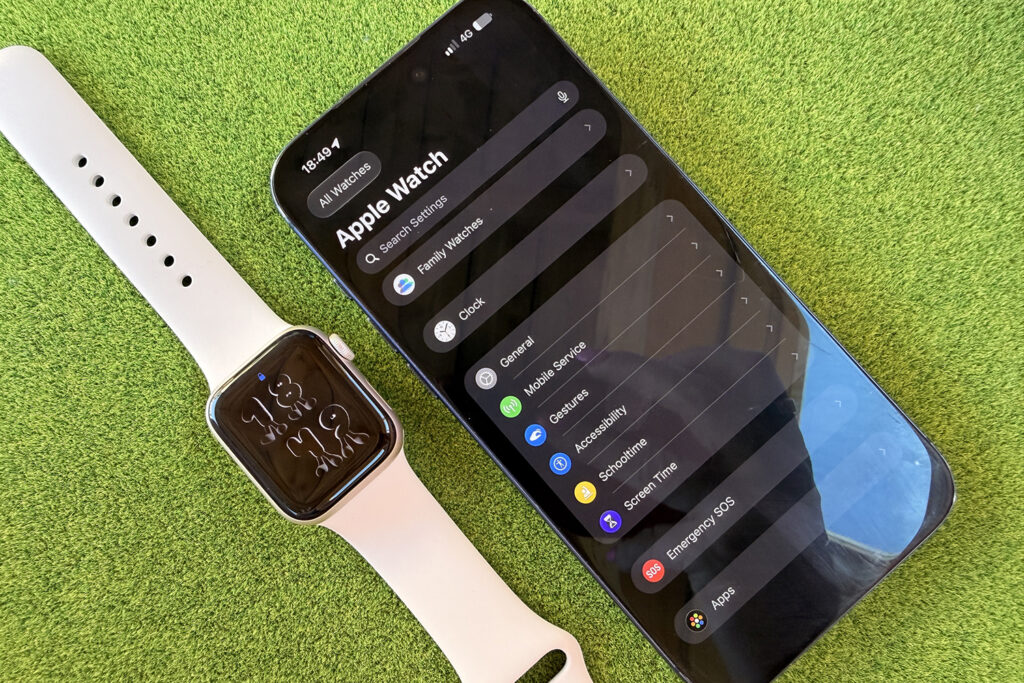
Next, you’ll need to bring your iPhone close to the Apple Watch. A pop-up should appear on your screen, exactly as it does when you’re setting up your own Apple Watch. If your phone is feeling shy, open the Watch app, tap All Watches, then Add Watch to give it a little nudge.

Apple Watch for Kids

You then need to select ‘Set Up for a Family Member’. This step is crucial because it turns a normal Apple Watch into a child-friendly one that you can control from your phone, without it sending messages and notifications from your phone to your already overly inquisitive eight-year-old. Align the Apple Watch screen with the rectangular viewfinder on your phone, as if you’re taking its passport photo, and the pairing process will begin.

The longest part of all this will be the inevitable software update you’ll need to do. You can’t proceed without it, so put the kettle on, grab a cuppa, and accept that it’s happening whether you like it or not.

Managing the Apple Watch for your kid

Apple Watch for Kids

Once the setup and pairing process is complete, you’ll be able to manage everything from your iPhone in the Watch app. You can set up the cellular plan, change the language, configure accessibility settings, and turn on features such as Cover to Mute.

You will also be able to choose trusted contacts your child can talk to, much like you can on iPhone and iPad, as well as choose notification settings and set up a Schooltime schedule so the Watch can’t become an alternative to times tables. 

There is a long list of other features, too, including adding or editing health details and Medical ID, managing a kid-friendly fitness experience, getting insights into your child’s screen time, and setting limits and a Downtime schedule so the Apple Watch can just be a watch again. 

Apple Watch for Kids

Screen time specifically lets you limit time away from the screen, restrict which contacts and the apps they can use to talk to people and clamp down on app purchases, explicit content (communication safety) and location sharing. 

And finally, if you don’t fancy a dead watch before lunchtime because your child has spent the entire morning gleefully playing with every app on the tiny screen, turn on Adaptive Power. You’ll find it under Settings then Battery on the Apple Watch itself, and it will dial back performance a little so buy you a few extra hours so you can track them on their way home from a bike ride.

Read more: Apple’s Screen Time will get big updates in iOS 27 – these are the settings to change before your kids find a way around them

google preferred source

Apple News

Read the full article here

Follow on Google News Follow on Flipboard
Share. Facebook Twitter Pinterest LinkedIn Tumblr Email Copy Link
News Room
  • Website

Related Posts

I wear Meta’s ‘pervert glasses’ every day – now I understand why people hate them

August 25, 2026

I love the Apple Watch Ultra 3 – but here are the must-have features would make the Ultra 4 even better

August 25, 2026

Our pick of the best video doorbells without a subscription – beat the price hikes

August 25, 2026
Add A Comment
Leave A Reply Cancel Reply

Top Articles

What to expect from Apple’s September event: iPhone Fold, iPhone 18 Pro, Apple Watch Ultra 4 and more

July 4, 2026

Swatch posts the correct answers to the MoonSwatch Mission to Moon 1969 ESTA quiz – did you pass?

July 23, 2026

We’ve reviewed the best tablets in 2026 – including iPad and Android picks for every budget

July 6, 2026
Latest Reviews

GuliKit’s Switch 2 TV dock gives me one feature I’ve missed when traveling

News RoomAugust 25, 2026

Greenworks’ MaximusZ electric riding mower has five motors and a few compromises

News RoomAugust 25, 2026

This tiny guitar amp is the most unhinged distortion pedal ever

News RoomAugust 20, 2026

Subscribe to Updates

Get the latest tech news and updates directly to your inbox.

Demo
Most Popular

You can now try Apple’s all-new Siri AI yourself on your iPhone, iPad or Mac – here’s how

July 13, 2026

What to expect from Apple’s September event: iPhone Fold, iPhone 18 Pro, Apple Watch Ultra 4 and more

July 4, 2026

Swatch posts the correct answers to the MoonSwatch Mission to Moon 1969 ESTA quiz – did you pass?

July 23, 2026
Our Picks

Apple’s new Mac Mini has fresh M6 and M5 Pro chip offerings — and higher prices

August 25, 2026

Apple’s ‘new’ polishing cloth is the same except $10 cheaper

August 25, 2026

I wear Meta’s ‘pervert glasses’ every day – now I understand why people hate them

August 25, 2026

Subscribe to Updates

Get the latest tech news and updates directly to your inbox.

Facebook X (Twitter) Instagram Pinterest
  • Home
  • Privacy Policy
  • Terms of use
  • For Advertisers
  • Contact
2026 © Prices.com LLC. All Rights Reserved.

Type above and press Enter to search. Press Esc to cancel.