
Close Menu
Gadget Guide News
  • Home
  • News
  • Features
  • Reviews
  • Best Stuff
  • Buying Guides
  • Deals

Subscribe to Updates

Get the latest tech news and updates directly to your inbox.

Trending

Anker’s Laptop Power Bank is $32 off for Cyber Monday, its biggest discount yet

December 1, 2025

Data centers in Oregon might be helping to drive an increase in cancer and miscarriages

November 30, 2025

This deal on smart glasses was too good for my husband to pass up

November 30, 2025
Facebook X (Twitter) Instagram
Gadget Guide News
Subscribe
  • Home
  • News
  • Features
  • Reviews
  • Best Stuff
  • Buying Guides
  • Deals
Gadget Guide News
  • Best Stuff
  • Buying Guides
  • Reviews
  • Deals
  • Features
Home»News»In iOS 26.1 Apple is making a change to alarms it should have made years ago
News

In iOS 26.1 Apple is making a change to alarms it should have made years ago

News RoomBy News RoomOctober 7, 2025012 Mins Read
Share Facebook Twitter Pinterest Copy Link LinkedIn Tumblr Email Telegram WhatsApp
Follow Us
Google News Flipboard
Share
Facebook Twitter LinkedIn Pinterest Email Copy Link

The latest beta of iOS 26.1 is now available for developers and eagle-eyed observers have spotted a potentially bacon-saving change for the best iPhone models and beyond.

If you’ve ever turned off your morning alarm when blindly pawing at your phone hoping to hit snooze then you’ll be pleased to know that in iOS 26.1 turning off the alarm requires a little more attention and intention.

The iOS 26.1 beta 2 includes a new live alarm screen requiring users to Slide to Stop the morning foghorn, while you can still tap to snooze the alarm.

If this new interface makes it into iOS 26.1 (betas are always subject to change), in theory, it should make it more difficult to accidentally turn off an alarm. And, hopefully, lessen the chances of missing an early flight to the airport, or an important work meeting. Well, not so much that latter part, we’ll lament the loss of that formerly cast iron excuse.
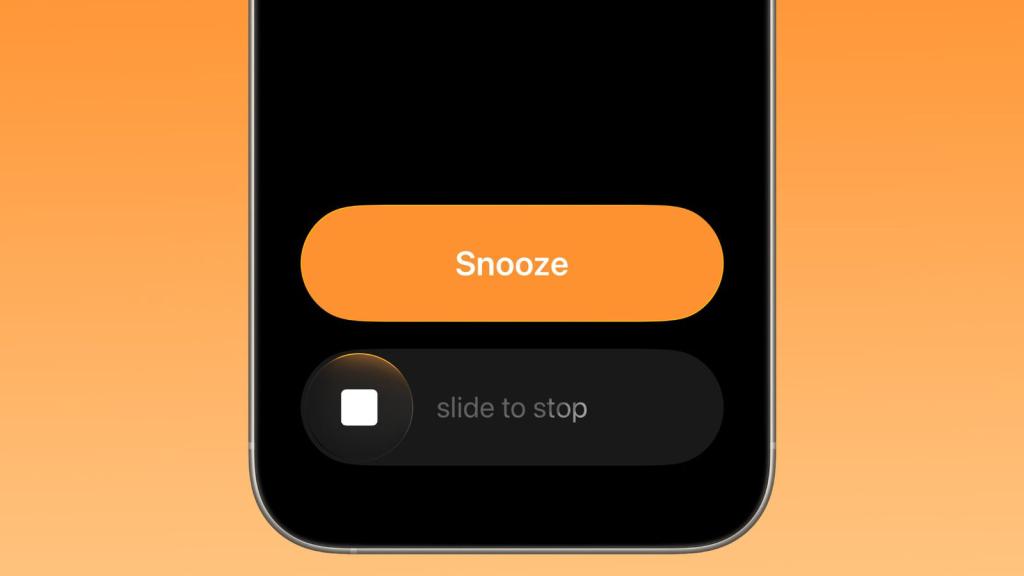
Image credit: MacRumors

As MacRumors pointed out, changes made between iOS 18 and iOS 26 actually made it easier to accidentally turn off the alarm when attempting to snooze. In the 2024 software, the buttons were smaller and farther apart on the display. In iOS 26 they are larger and closer together. Now the Slide to Stop feature retains the new design but should prevent the commands being conflated in the morning haze.

Elsewhere in iOS 26.1, Apple is equipping more stock apps with its new Liquid Glass design language, while Apple Intelligence support is coming to eight new languages. Essentially, this release is about refining the new experience debuted in September, which upended Apple’s naming conventions to match the year they’re designed for.

New features in iOS 26 included the aforementioned Vision Pro-inspired Liquid Glass aesthetic along with some excellent new multitasking capabilities for iPadOS 26. There’s also a new AI-powered live translation service, Call Screening, Hold Assist, polls in Messages and loads more.

Overall, it was one of the more significant updates of recent years. Now Apple is setting about making smaller refinements. Starting with helping to ensure you get up on time.

If you’re still exploring the new operating system, here are some of our favourite iOS 26 tips and tricks. iOS 26.1 will likely be out at some point this month.

Read the full article here

Follow on Google News Follow on Flipboard
Share. Facebook Twitter Pinterest LinkedIn Tumblr Email Copy Link
News Room
  • Website

Related Posts

Anker’s Laptop Power Bank is $32 off for Cyber Monday, its biggest discount yet

December 1, 2025

Data centers in Oregon might be helping to drive an increase in cancer and miscarriages

November 30, 2025

This deal on smart glasses was too good for my husband to pass up

November 30, 2025
Add A Comment
Leave A Reply Cancel Reply

Top Articles

A bundle with Amazon’s biggest smart display and a stand just got its biggest discount

October 3, 2025

The OnePlus 15 is the phone to buy if you hate charging your phone

November 13, 2025

Kodak’s has ‘new’ 35mm film on the market – here’s why it’s a big deal

October 3, 2025
Latest Reviews

Rivian’s software-powered e-bike won me over with its adaptability 

News RoomNovember 28, 2025

Arturia’s AstroLab 37 crams 44 synths into a tiny keyboard

News RoomNovember 25, 2025

The 5 best noise-canceling headphones of 2025

News RoomNovember 25, 2025

Subscribe to Updates

Get the latest tech news and updates directly to your inbox.

Demo
Most Popular

Pixel Airdropping to iPhones, Macs, and iPads works great

November 21, 2025

A bundle with Amazon’s biggest smart display and a stand just got its biggest discount

October 3, 2025

The OnePlus 15 is the phone to buy if you hate charging your phone

November 13, 2025
Our Picks

You need to read the treatise on spacing out, Bored and Brilliant

November 30, 2025

How AI models might change the way you use your computer

November 30, 2025

It doesn’t end at Neuralink

November 30, 2025

Subscribe to Updates

Get the latest tech news and updates directly to your inbox.

Facebook X (Twitter) Instagram Pinterest
  • Home
  • Privacy Policy
  • Terms of use
  • For Advertisers
  • Contact
2025 © Prices.com LLC. All Rights Reserved.

Type above and press Enter to search. Press Esc to cancel.