


Introduction
As part of the 20% of UK TV owners that doesn’t have an aerial, I’m the perfect candidate for Manhattan’s Aero 4K TV Streamer – but that’s not to say the tiny Freely set-top box can’t also smarten up your telly too. Maybe you want broadcast TV in another room but don’t have an aerial socket – and don’t fancy paying a professional to put one in. This £70 streamer is the inexpensive alternative anyone can fit, without having to break out a ladder or power tools.
It also doesn’t incur a monthly subscription like Sky Stream and Virgin Media Stream, is a heck of a lot cheaper than buying a whole new TV with Freely built-in, and comes with a user-friendly TiVo interface that’ll have many older smart TV systems licked for speed and streaming support. With the UK government still considering a terrestrial switch-off in the 2030s in favour of Internet provided television (IPTV), it will also future-proof your home cinema setup.
Design & features: box clever
The box itself has the same footprint as a drinks coaster and is a sliver thinner than the latest Apple TV 4K. Since the accompanying remote is wireless rather than infrared, you can stash the box completely out of sight if you like. A dongle-style design would’ve made this even easier, admittedly, but some stick-on wall mounts will only set you back a few pounds and let it lurk behind your TV. It draws more power than your TV’s USB ports can supply, however, meaning the bundled power brick is a necessity.
There’s a solitary HDMI port at the rear (with a cable included in the box) which supports up to 4K resolution at 60Hz. It won’t do Dolby Vision, but plays nicely with HDR10+ and supports Atmos passthrough if you’ve got a compatible home theatre system or soundbar. The wired Ethernet port is handy if your Wi-Fi network isn’t especially speedy, and the single USB-C port lets you hook up an external drive for playing local content through Plex. Just don’t plan on turning the box into a miniature PVR; Freely is all about streaming content, with no way to record shows.
Other goodies include Google Cast support, letting you beam content from pretty much any device with a web browser, and Bluetooth connectivity. I used it to hook up a set of wireless speakers and some headphones; neither gave any audio/video delay on the default settings, but there’s a handy delay slider if you run into any issues.
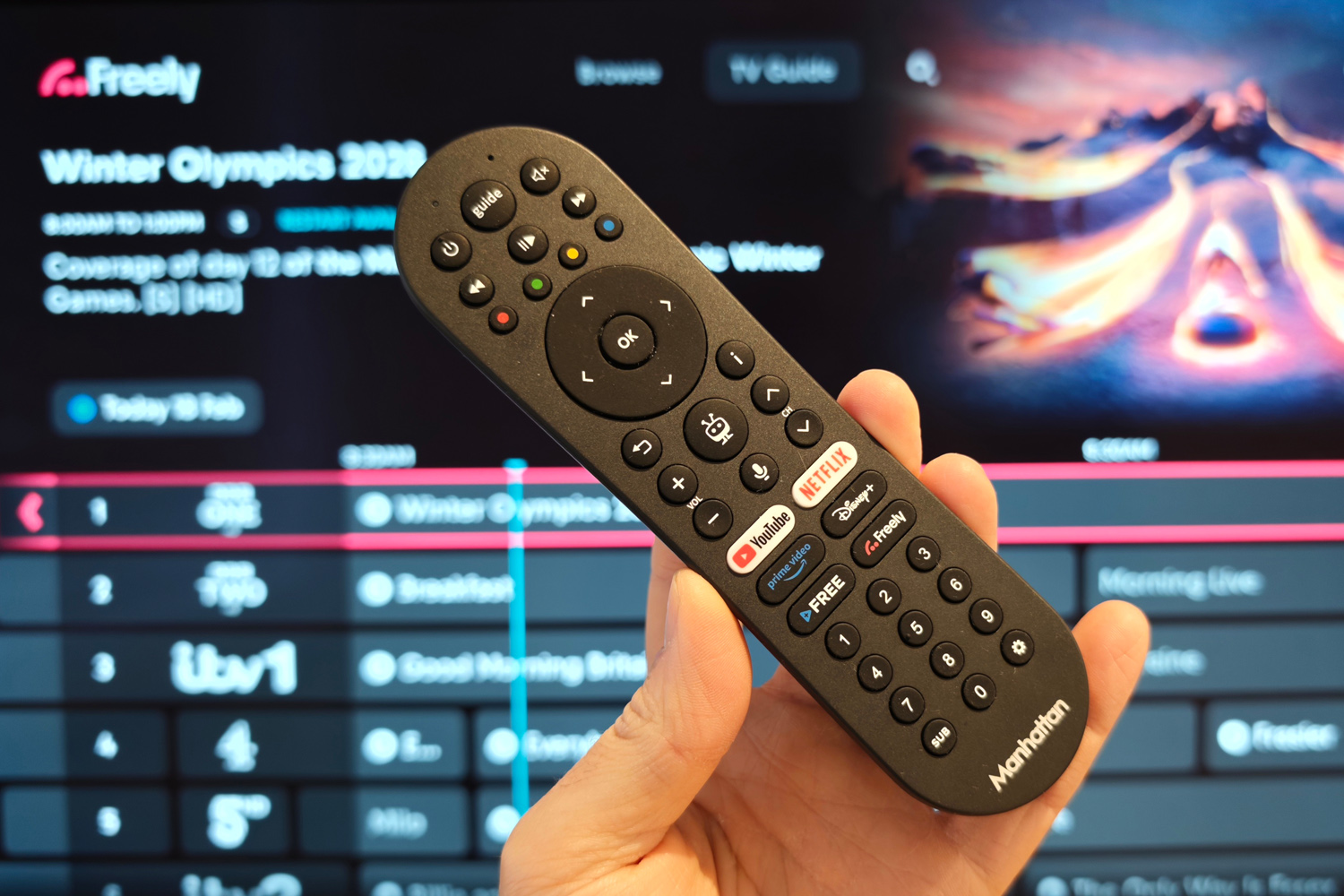
The remote control has shortcuts to Freely and the major streaming providers, plus a built-in mic to ask the TiVo voice assistant for viewing suggestions. It’s also got a full set of number buttons, so you can still bounce between live TV channels like it’s the 1990s (assuming you can remember the numbers for your favourites). HDMI-CEC lets it adjust volume of a connected TV or soundbar too.
Interface: free and easy

Freely is the main event here: you’re getting 70 live TV channels from the BBC, ITV, Channel 4 and 5, beamed over the internet instead of an aerial, plus over 75,000 hours of on-demand and catch-up content.
The user interface is tightly controlled by Everyone TV (the group also responsible for Freeview and Freesat), so it looks the same here as it does on every TV I’ve tried with the service built in. Currently that includes Philips, Panasonic, Hisense and TCL, while Sony, Samsung and LG have yet to get on board.
On startup you’re dropped into the Browse screen, which has large previews of what’s live right now along with shortcuts to each broadcaster’s catch-up service. Trending shows and top genre picks sit below. There’s also a seven day programme guide with detailed episode descriptions.
Pick a broadcast and it starts streaming in a few seconds. From here an onscreen miniguide details the current programme, adds a prompt to start playback from the beginning of the episode (through the relevant on-demand service) and has a shortcut to series catch-up.
It’s all brilliantly intuitive, even picking the correct regional broadcasts based on the postcode you enter during the initial setup. There’s no waiting between pressing the remote and the interface reacting, and preview thumbnails appeared pretty much instantly. The white-on-black UI is easy to read and doesn’t overwhelm you with settings or excess information.
TiVo is the other side of the coin, and where you head for any subscription-based streaming. Netflix, Disney, Prime Video and YouTube are all present, along with a bunch of smaller services. Apple TV, Paramount+, Discovery+ and Now are the big omissions, though some can be accessed via Prime Video and others can be casted from another device.
It’s just as easy to navigate as Freely, with equally big preview images and lots of content recommendations (though YouTube’s suggestions seemingly had no bearing on my watch history or subscriptions). A menu at the side also lets you dive into TiVo+ Free, TiVo’s own selection of more than 400 free IPTV channels and on-demand content. It takes an age to scroll through, though; a TV guide would really come in handy here.
I like that the Aero turns on to whatever service you had open last. If I was watching Freely before, it opens to that channel; if I was using a streaming service, I got the TiVo homepage.
Performance: no waiting around

Manhattan doesn’t say exactly which quad-core chipset is powering the Aero 4K TV Streamer, but it’s potent enough to make both Freely and TiVo feel perfectly nippy. I found that channels even started streaming sooner on this box than they did on the HiSense Freely TV I have in my bedroom.
Netflix, Amazon Prime and YouTube were all pretty much flawless, too. The fact TiVo remotely hosts all its streaming apps rather than install them on the box itself helps. Adding new ones is instantaneous and you never have to worry about apps demanding updates before you sit down for a binge-watching session; something I notice regularly with my living room LG TV, which is only a few years old.
A Wi-Fi 6 wireless connection proved fast enough to play 4K content from my living room router to my garage on the other side of the house, no buffering or dropping down to a lower quality stream.
Manhattan Aero 4K TV Streamer with Freely verdict

The first set it-and-forget it Freely streaming box is a near-perfect addition to your home cinema setup, whether you lack an aerial or just want higher quality broadcast TV without forking over cash very month to Sky or Virgin.
It’s small enough to stash pretty much anywhere, and the speedy TiVo interface is a marked improvement over most built-in smart TV systems, coming with most (but not all) of the top streaming services.
Manhattan Aero 4K TV Streamer with Freely technical specifications
| Picture output | Up to 4K/60Hz |
| Processor | Quad-core |
| Smart TV OS | TiVo |
| Connectivity | Wi-Fi, Bluetooth, Ethernet |
| Storage | N/A |
| VIdeo formats | SDR, HDR10+, HLG |
| Dimensions | 96x96x26mm, 190g |
Read the full article here
