Close Menu
Gadget Guide News
  • Home
  • News
  • Features
  • Reviews
  • Best Stuff
  • Buying Guides
  • Deals
  • More Articles

Subscribe to Updates

Get the latest tech news and updates directly to your inbox.

Trending

Google’s Pixel Watch 5 is promising — but it isn’t finished

August 19, 2026

AI-powered IVF robots are already making human embryos – but are they really better at it than us?

August 19, 2026

The Pixel 11 Pro XL is Google’s phone best yet – but after living with it I’m not sold on one key feature

August 19, 2026
Facebook X (Twitter) Instagram
Gadget Guide News
Subscribe
  • Home
  • News
  • Features
  • Reviews
  • Best Stuff
  • Buying Guides
  • Deals
  • More Articles
Gadget Guide News
  • Best Stuff
  • Buying Guides
  • Reviews
  • Deals
  • Features
Home»Reviews»The Pixel 11 isn’t the best Pixel of 2026, but it’s the smartest buy
Reviews

The Pixel 11 isn’t the best Pixel of 2026, but it’s the smartest buy

News RoomBy News RoomAugust 19, 2026028 Mins Read
Share Facebook Twitter Pinterest Copy Link LinkedIn Tumblr Email Telegram WhatsApp
Follow Us
Google News Flipboard
Share
Facebook Twitter LinkedIn Pinterest Email Copy Link

It’d be easy to overlook the Pixel 11. Want the best cameras? The Pixel 11 Pro is your answer. Want the best bargain? The Pixel 10A is still a great deal.

But the Pixel 11 might be the sweet spot in Google’s lineup this year. With 12GB of RAM and 256GB of storage, it delivers the same performance as the base Pixel 11 Pro for $899 — $200 less. And while it’s $400 more than the Pixel 10A, it has a faster processor, more RAM and storage, Qi2 charging, and a telephoto lens.

It’s also the cheapest way to experience what’s actually new about the Pixel 11 series. With the hardware basically unchanged from the Pixel 10 except for new colors and a thinner camera bar, the spotlight this year has shifted to software, specifically features that aim to take full advantage of what most Pixel fans like about their phones: the cameras and special features that make the phones just a bit more helpful.

Last year, we said Google’s Pixel 10 was priced fairly at $799, and that it’d be greedy for buyers to expect more from it. Well, RAMageddon happened, and everyone’s prices went up. The new Pixel 11 starts at $899 and has mostly the same specs. It adds a few exclusive software features that mostly make up for it and doubles the base storage. I guess it’d be greedy to expect much more from this one, too.

$899

The Good

  • Great design
  • Wireless charging boosted to 25W
  • Exclusive camera features are mostly fantastic

The Bad

  • Very few gen-to-gen hardware improvements
  • $899 is a lot even with double the starting storage
  • Proactive Assistance isn’t worth upgrading for yet

The Pixel 11 looks, feels, and performs similarly to the $1,099 11 Pro. The Pro has a brighter, higher-resolution screen and much more powerful ultrawide and telephoto cameras, but the 11 is just as good in nearly every other way. It has the same Tensor G6 processor, and it even has the same amount of RAM as the base model Pro phone (though the more expensive Pro configurations have 16GB). In day-to-day use, I didn’t notice any performance issues owing to the smaller amount of RAM on the 11, though it’s possible that the newer processor balanced it out.

Google didn’t hold back any of the software features from this model, either. As someone who doesn’t upgrade their phone unless they have to (I’m still very happy with my Pixel 9 Pro), I was skeptical that some of the phones’ most intriguing new camera features — Camera Looks and Magic Capture — would be enough to temp me. Unfortunately for those like me who are holding off on upgrading for as long as possible, both features are rad.

Like last year, the 11 has a 48MP main camera, 13MP ultrawide, and 10.8MP 5x telephoto, all of which are smaller and lower resolution than the sensors on the Pro phones. My Pixel 9 Pro’s wide and ultrawide lenses are roughly on par with the 11 Pro’s, and quite a bit more capable than the Pixel 11’s. But in the past week of testing, I don’t miss them as much as I thought I would. Camera Looks in particular helped me have more fun shooting with a Pixel than I have in years. It’s satisfying to quickly swap between different sensor-level presets, and they can make a big impact on how a photo turns out.

The Pixel 11 is fast enough to snag not just a good photo of a Spider-Man imposter on the Brooklyn Bridge while driving by in a car, but a great one.

The Pixel 11 is fast enough to snag not just a good photo of a Spider-Man imposter on the Brooklyn Bridge while driving by in a car, but a great one.

I’ve been a Pixel user since 2017, going from the 2 to the 3 to the 6 to the 9 Pro, almost entirely because of the cameras. I trust them to take great shots quickly and with little effort. I even brought the Pixel 2 on my honeymoon trip instead of a DSLR, and no, I don’t regret it all these years later. If you’re a serious phone photographer who spends time composing every shot, you’ll probably want to go for the Pro, but for more casual photographers like me, the quality difference isn’t that noticeable, especially with Camera Looks applied. Camera Looks has even encouraged me to slow down sometimes to put a little more effort into my composition.

Camera Looks seems like Google’s realization that the Pixel’s default vibrant HDR-drenched look isn’t the best choice for every photo. Now, it’s easy to switch to the bold, slightly more muted “Digi” or the black-and-white “Black Tie” styles when you want to take a more impactful photo. If you like one of the Looks enough to make it your default shooting style, you can lock it in. And it’s easier to make adjustments on the fly, thanks to the new quick access dials you can pin to the viewfinder. You can add dials for exposure, color temperature, and shadows.

1/6

The “Velvet” style, at least in this example, bridges the gap between “Digi” and the default look.

Magic Capture — another camera feature exclusive to the 11 series — is genuinely useful. The hybrid camera mode records a video and intelligently plucks hi-res photos and video clips from it, and I used it to capture a bunch of little moments with our two-year-old at the beach and at parks. It’s convenient to have a setting that can capture the unexpected without missing a beat. You can also manually capture photos while it’s recording. However, the photos are the highlight, not the video (the resulting video looks choppier than a standard video, as if it lacks image stabilization; it doesn’t seem like it’s meant for consumption). I’m more the type who’d like to shoot individual photos, as it feels great to happen upon a spectacular shot. But the AI does a good enough job at capturing little moments in the action.

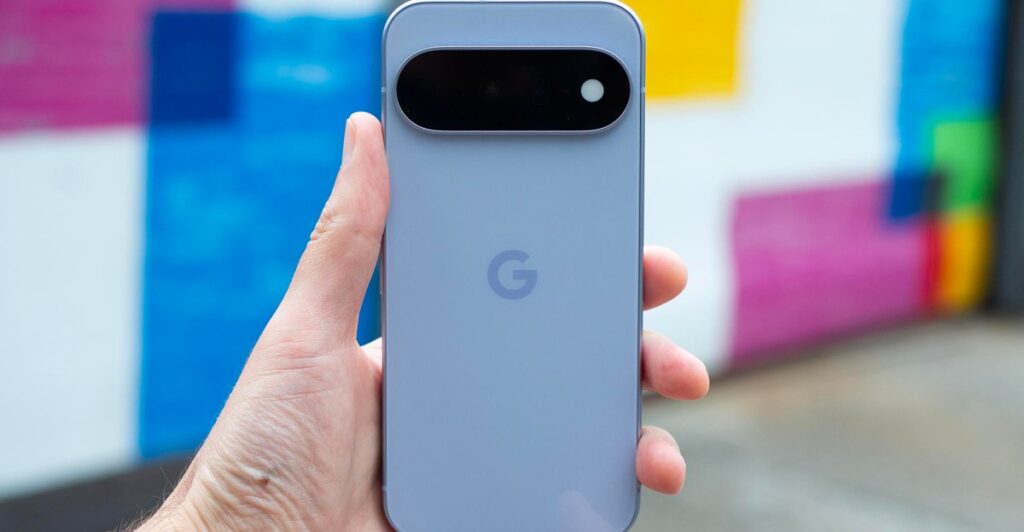
Google Pixel 11 in front of brightly colored blurry background.

The Pixel 11’s camera bar is a little thinner than before, and Google’s new Pixelsnap case makes it sit flat on a table.
Photo: Cameron Faulkner / The Verge

Another new software component available only on the Pixel 11 lineup is Gemini’s Proactive Assistance feature. It’s meant to handle more of the grunt work of using a phone for things like managing calendars, making reservations, and buying groceries. To actually have it do things for you, you need to give the agentic AI permission (it’s not on by default) to make changes within an array of apps, ranging from Google’s productivity suite to apps like OpenTable, Instacart, Google Messages, and more. It’s partially helpful, but like an intern that gets just enough wrong that you just feel better doing it yourself.

In my back-and-forth text-a-thon with David Imel, who reviewed the 11 Pro, Proactive Assistance was more miss than hit. One of the features Google advertises is an OpenTable integration that pops up a Gemini chip to book a restaurant reservation if it sees a relevant message. We could only get it to work by being as specific and formal as possible, including the restaurant’s full name and the specific day and time. That’s not how most people type to each other.

Illuminated screen of a Google Pixel 11 in a person’s hand in front of a blurry background of graffiti.

The Pixel 11’s screen resolution is equivalent to the Pixel 10 as well as the Pixel 10A.
Photo: Cameron Faulkner / The Verge

Here’s another example of Proactive Assistance in action: I was able to order groceries through my grocery list in Google Keep, but only after I figured out some unstated rules. After I enabled access to both Google Keep and Instacart in Gemini’s settings, I had to adjust the title of my Google Keep list to include “Instacart” (so much for being able to use natural language). Afterward, the feature quickly connected me with a list of nearby retailers that could fulfill my order, just like it does in the Instacart app. Proactive Assistance is intriguing, but I hope it gets better. You can read more about the feature’s quirks in David’s review; for now, it’s not worth upgrading for.

Google’s Pixel 11 leaning against a windowsill.

Google’s latest Pixel looks similar to its predecessor, but that’s not a bad thing.
Photo: Cameron Faulkner / The Verge

When I bought the Pixel 9 Pro two years ago, I picked the Pro because it was much better. It had a telephoto camera, more RAM, and more special features than the standard model. And its price came in under $1,000.

This year, that’s all changed. The standard Pixel 11 now has a telephoto lens and just as much RAM as the $1,099 Pro, it’ll get all the same software features, and it’s now the one with a price under four digits.

If you’re serious about phone photography, the 11 Pro is probably worth it for the bigger camera sensors. However, as someone who bought the Pixel 9 Pro two years ago, the Pixel 11’s blend of good-enough hardware and compelling software feels Pro enough to me.

Photography by Cameron Faulkner/The Verge

Follow topics and authors from this story to see more like this in your personalized homepage feed and to receive email updates.

  • Cameron Faulkner

    Cameron Faulkner

    Cameron Faulkner

    Posts from this author will be added to your daily email digest and your homepage feed.

    See All by Cameron Faulkner

  • Google

    Posts from this topic will be added to your daily email digest and your homepage feed.

    See All Google

  • Google Pixel

    Posts from this topic will be added to your daily email digest and your homepage feed.

    See All Google Pixel

  • Phone Reviews

    Posts from this topic will be added to your daily email digest and your homepage feed.

    See All Phone Reviews

  • Reviews

    Posts from this topic will be added to your daily email digest and your homepage feed.

    See All Reviews

  • Tech

    Posts from this topic will be added to your daily email digest and your homepage feed.

    See All Tech

Read the full article here

Follow on Google News Follow on Flipboard
Share. Facebook Twitter Pinterest LinkedIn Tumblr Email Copy Link
News Room
  • Website

Related Posts

Google’s Pixel Watch 5 is promising — but it isn’t finished

August 19, 2026

The Pixel 11 Pro XL is Google’s phone best yet – but after living with it I’m not sold on one key feature

August 19, 2026

Hands-on with the Mova V70, a robot vacuum with a mopping arm 

August 19, 2026
Add A Comment
Leave A Reply Cancel Reply

Top Articles

What to expect from Apple’s September event: iPhone Fold, iPhone 18 Pro, Apple Watch Ultra 4 and more

July 4, 2026

Swatch posts the correct answers to the MoonSwatch Mission to Moon 1969 ESTA quiz – did you pass?

July 23, 2026

Upcoming Apple products guide – here’s everything we expect in 2026 and beyond

July 10, 2026
Latest Reviews

Google’s Pixel Watch 5 is promising — but it isn’t finished

News RoomAugust 19, 2026

The Pixel 11 Pro XL is Google’s phone best yet – but after living with it I’m not sold on one key feature

News RoomAugust 19, 2026

The Pixel 11 isn’t the best Pixel of 2026, but it’s the smartest buy

News RoomAugust 19, 2026

Subscribe to Updates

Get the latest tech news and updates directly to your inbox.

Demo
Most Popular

You can now try Apple’s all-new Siri AI yourself on your iPhone, iPad or Mac – here’s how

July 13, 2026

What to expect from Apple’s September event: iPhone Fold, iPhone 18 Pro, Apple Watch Ultra 4 and more

July 4, 2026

Swatch posts the correct answers to the MoonSwatch Mission to Moon 1969 ESTA quiz – did you pass?

July 23, 2026
Our Picks

We reviewed the new Pixel lineup, ask us anything

August 19, 2026

The Pixel 11 isn’t the best Pixel of 2026, but it’s the smartest buy

August 19, 2026

The Google Pixel Watch 5 is a more refined version of an Android wearable favourite – but only by the smallest margin

August 19, 2026

Subscribe to Updates

Get the latest tech news and updates directly to your inbox.

Facebook X (Twitter) Instagram Pinterest
  • Home
  • Privacy Policy
  • Terms of use
  • For Advertisers
  • Contact
2026 © Prices.com LLC. All Rights Reserved.

Type above and press Enter to search. Press Esc to cancel.