







Introduction
It doesn’t matter how good you think you are at Call of Duty or League of Legends – the chances of you making a career out of gaming are ridiculously slim. So Logitech gets props for making a keyboard that isn’t trying to cater to the professional elite. The G512 X is aimed more at those wanting to dip a toe into high-end analogue keyboard tech, rather than giving up the satisfying ‘thwack’ of mechanical keys.
Rather than roll out costly tunnelling magnetoresistance (TMR) tech across the entire ‘board, Logitech has gone for a half-and-half approach – and left the choice of which switches give analogue adjustment to you. Both the 75% and 98% sizes (I’ve been testing the former) ship with mechanical keys, but come with a tinkerer’s toolkit baked right into the board for when you want to mix things up.
With prices starting at $180/£170 it lands in the same ballpark as rival boards that are entirely analogue. Is flexibility enough to make it a must-have for home workers that enjoy a bit of multiplayer mayhem in their downtime?
Design & build: plastic fantastic
Logitech has been on a roll with innovative products lately. The Pro X2 Superstrike mouse and its haptic buttons has taken up permanent residence on my desk, being laser accurate and whip-crack fast for gaming but also near-silent for daily use. The G512 X 75 isn’t quite so revolutionary, but the firm has done a fantastic job of integrating its unique features.
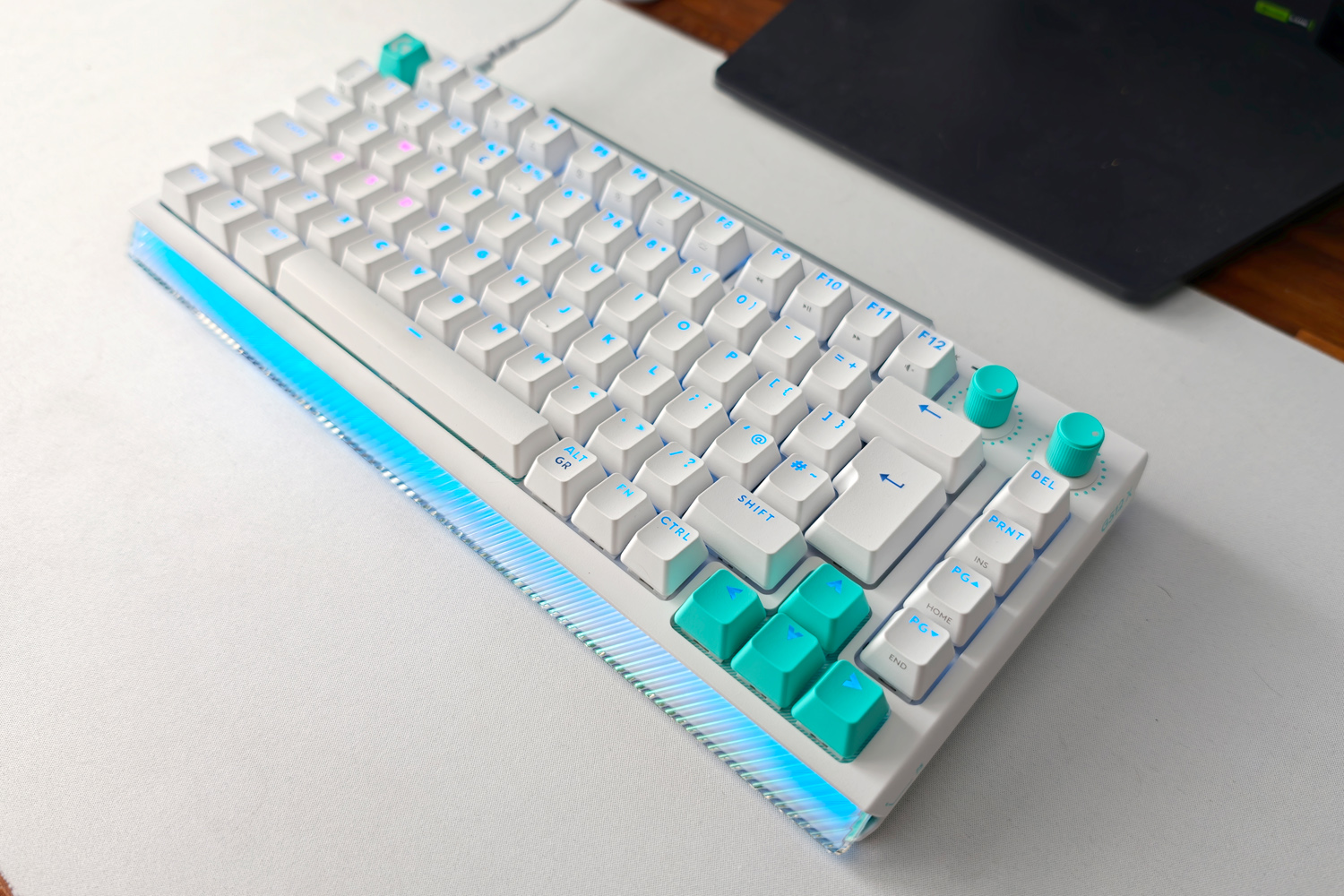
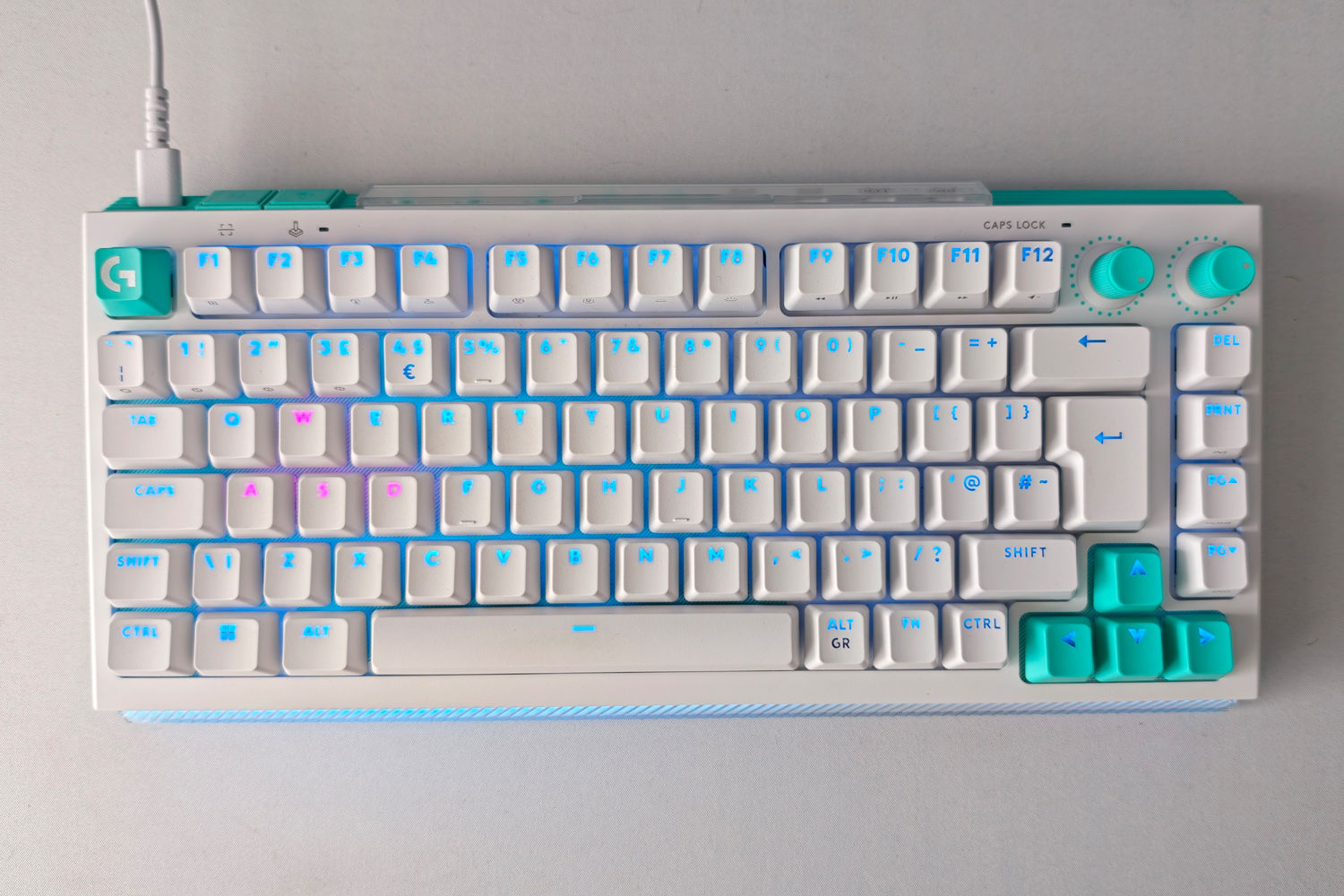
From the front it looks fairly unassuming, with a conventional 75% layout and two handy dials in the top right corner. These default to volume and RGB brightness controls, but can be customised in Logitech’s G Hub software. On the white version I tested they are a distinctive mint green hue, as are the escape and arrow keys – though there are white spares keycaps in the box if you prefer a uniform look.
The black model has purple accents instead; both are a good fit for Logitech’s ‘Pulsar point’ default illumination, which also match the G502 X Plus mouse. As well as per-key lighting (which has excellent coverage save for the few keys with multiple accent characters, like the 4/$/€ key), the entire front lip glows through a lenticular panel that softly lights up your desk. An official acrylic palm rest amplifies that diffusion very effectively, but it’s an optional extra that’ll set you back an additional $40/£35.
It’s only when you flip the G512 X around that you’ll spot the row of nine Gateron KS-20 key switches, stowed beneath a protective plastic cover. Five second actuation pressure point (SAPP) rings lurk just beneath, while the keycap and switch pullers cleverly double as feet that angle the ‘board to a comfortable typing position. After any tinkering, pressing a button to the side of the switch storage sweeps the keyboard, Knight Rider-style, looking for any analogue additions. It’s all very slick. There’s also a Game mode button here that disables inputs like the Windows key, saving you from an accidental trip back to the desktop mid-game.
My only real grumble is that there’s no escaping the all-plastic build. Lots of rivals in this price range have metal top plates, if not entirely metal construction. It has a decent weight and grippy feet, so doesn’t slide around your desk at all, but there’s a bit more deck flex here than you’ll find on a metal alternative.
Features & software: switch it up
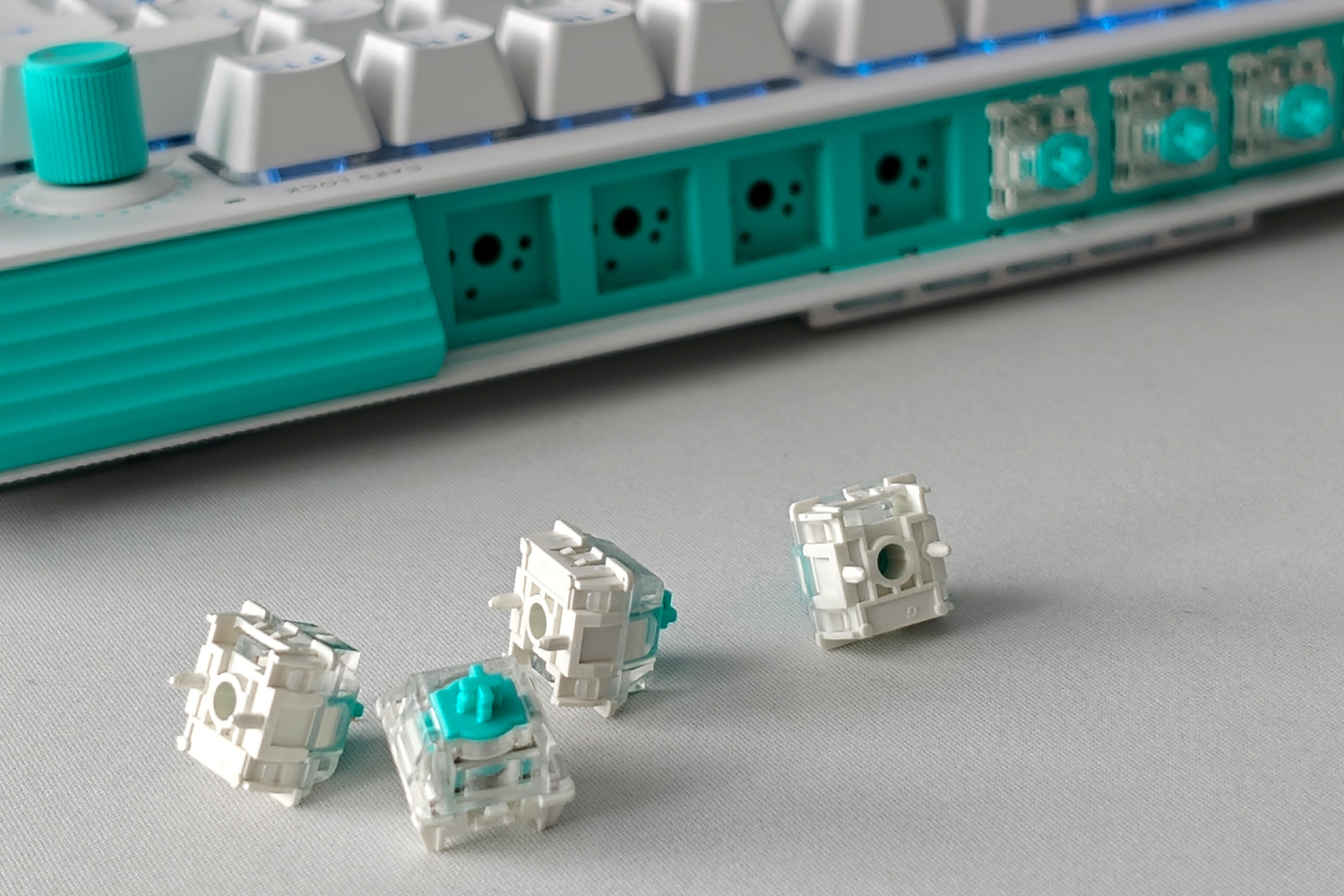
There really aren’t many keyboards that’ll accept both mechanical and analog switches at the same time; the Glorious GMMK 3 Pro HE is one example, but it costs nearly twice the price of the Logitech. They’re hot-swappable, meaning you don’t need to power off the ‘board before breaking out the switch puller, and making a change is a breeze. Not so quick that owners will be swapping on the regular, but still very convenient.
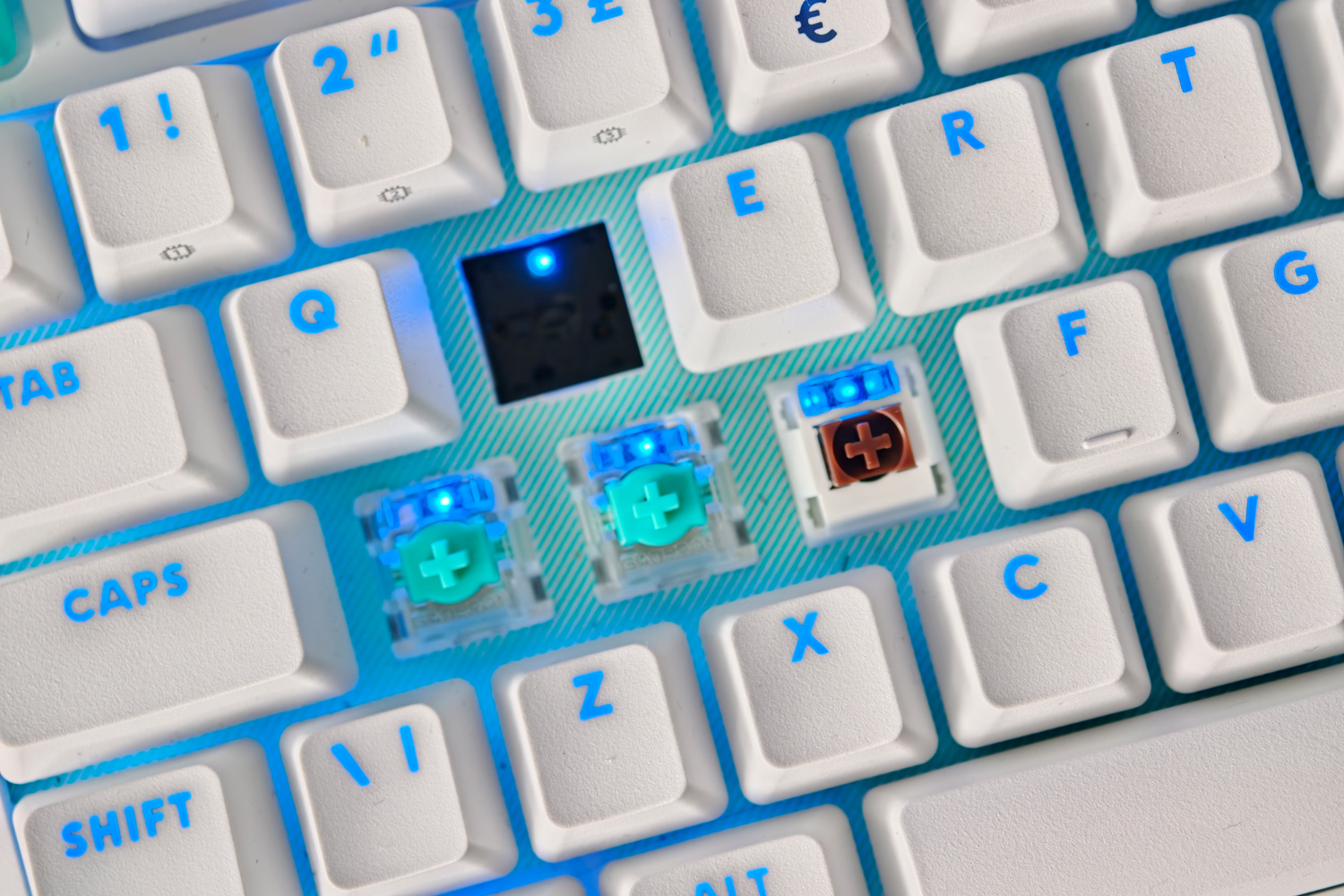
Unless you’re raiding in World of Warcraft with a million shortcut keys, I don’t think you’ll feel short-changed by the nine analog switches included here. Most FPS and MOBA players will be fine with movement keys and a few action-oriented inputs. Even if you buy more, not every switch socket supports analog: everything beyond the the U, J and M keys (apart from the arrow keys) are mechanical only.
Logitech’s G Hub software then lets you get properly granular with the analog inputs, setting the actuation point (or how far into the keypress before it registers each key) anywhere between 0.1mm and 4mm. At the most extreme setting keys become hair triggers, activated with the lightest of touches – or far too sensitive to use for simple typing. Per-game profiles are the way forward here.
You can also set two inputs to a single key – say walking with light pressure, or running with a firmer prod – which is where the SAPP rings come in clutch. I found they added just enough extra resistance to make two-stage inputs usable in games without having to second-guess the amount of force I applied.
Most of the other functions I’d expect from an analog keyboard are here too, including rapid trigger and key priority – though as with pretty much every rival keyboard, activating one key while holding down the other can incur the wrath of certain game anti-cheat systems and is best used with caution online.
The G512 X has a true 8,000Hz polling rate, so there can’t be any blaming input lag for your online ineptitude – but it’s a shame the USB-C to USB-A cable is your only choice when it comes to connectivity. You don’t have to spend much more to find fully analogue keyboards with 2.4GHz wireless dongles, or even 3-in-1 models with Bluetooth on board as well. It rather spoiled the look of my otherwise wire-free desk.
Performance: mix and match
Straight out of the box, the G512 X 75’s all-mechanical layout has a distinctive actuation point, with a noticeable bump halfway through the key travel. Each one needs a fairly light 38g of force to register an input. My review unit shipped with tactile switches, which are satisfyingly clacky in use; there’s also a version with linear switches that should be smoother (and a little quieter).
Internally everything has been dampened well, so there are no noises or rattles coming from inside the case, though the keys themselves to wobble a bit. The doubleshot PBT keycaps are wear-resistant and have just enough texture to aid grip.
I worried that having a mix of analog and mechanical switches would mess with my typing speed, but that thankfully wasn’t the case. While after switching my W, A, S and D keys I did notice their lack of resistance and smoother keypress – a result of having no physical mechanism – when the actuation points were left at stock settings my words-per-minute rate didn’t take a hit.
Adding the SAPP rings made for a starker contrast; the tweaked keys became squishier, bottom out more softly, and have a different sound. Again, it’s subtle, and one I didn’t mind for everyday use.
Logitech G512 X 75 verdict

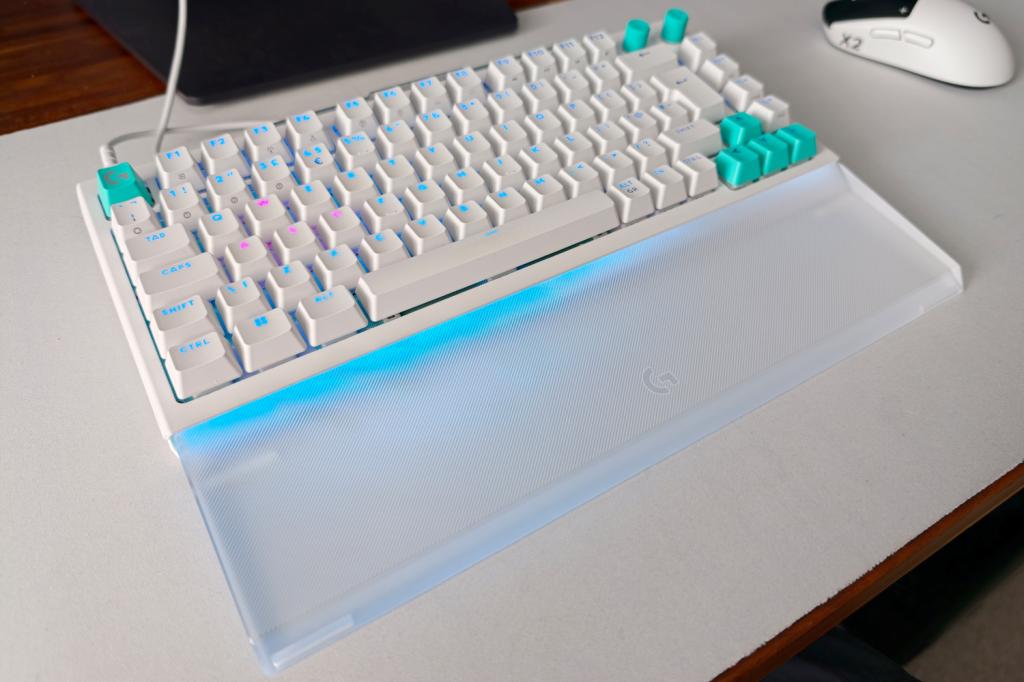
By dipping a toe into analog keyboards and keyboard modding on the whole, the G512 X 75 should appeal to gamers that want to experiment without also needing a screwdriver and soldering iron. Swapping switches is entirely self-contained and seamless through software, while the rest of the ‘board is well equipped. It also looks the part, with distinctive colours and bright RGB effects.
There are no shortage of rivals with all-analog TMR switches, though. The Keychron Q1 Ultra 8K Wireless even cuts the cord and has a full metal chassis. The G512 X’s plastic build is a bit disappointing, as is the wired-only connectivity and having to pay extra for the wrist rest.
Anyone wanting more customisation for their cash may be better looking elsewhere, but this is a valiant attempt to bridge the gap between mainstream gamers and serious custom keeb enthusiasts.
Logitech G512 X 75 technical specifications
| Keyboard style | 75%/98-key |
| Switch type | Logitech MX Mechanical, 9x Gateron KS-20 magnetic analog switches |
| Connectivity | USB-C |
| Dimensions | 330x150x48mm, 862g (75%) |




Read the full article here


