
Close Menu
Gadget Guide News
  • Home
  • News
  • Features
  • Reviews
  • Best Stuff
  • Buying Guides
  • Deals
  • More Articles

Subscribe to Updates

Get the latest tech news and updates directly to your inbox.

Trending

Apple TV is offering the next F1 Grand Prix for free in the United States – here’s how to watch

June 18, 2026

You can now use the Game Boy Camera with your phone

June 18, 2026

iPhone Air 2 rumoured to resolve our two biggest complaints, but is an Apple sequel even desired?

June 18, 2026
Facebook X (Twitter) Instagram
Gadget Guide News
Subscribe
  • Home
  • News
  • Features
  • Reviews
  • Best Stuff
  • Buying Guides
  • Deals
  • More Articles
Gadget Guide News
  • Best Stuff
  • Buying Guides
  • Reviews
  • Deals
  • Features
Home»News»Photoshop and Premiere now have AI assistants
News

Photoshop and Premiere now have AI assistants

News RoomBy News RoomJune 18, 2026023 Mins Read
Share Facebook Twitter Pinterest Copy Link LinkedIn Tumblr Email Telegram WhatsApp
Follow Us
Google News Flipboard
Share
Facebook Twitter LinkedIn Pinterest Email Copy Link

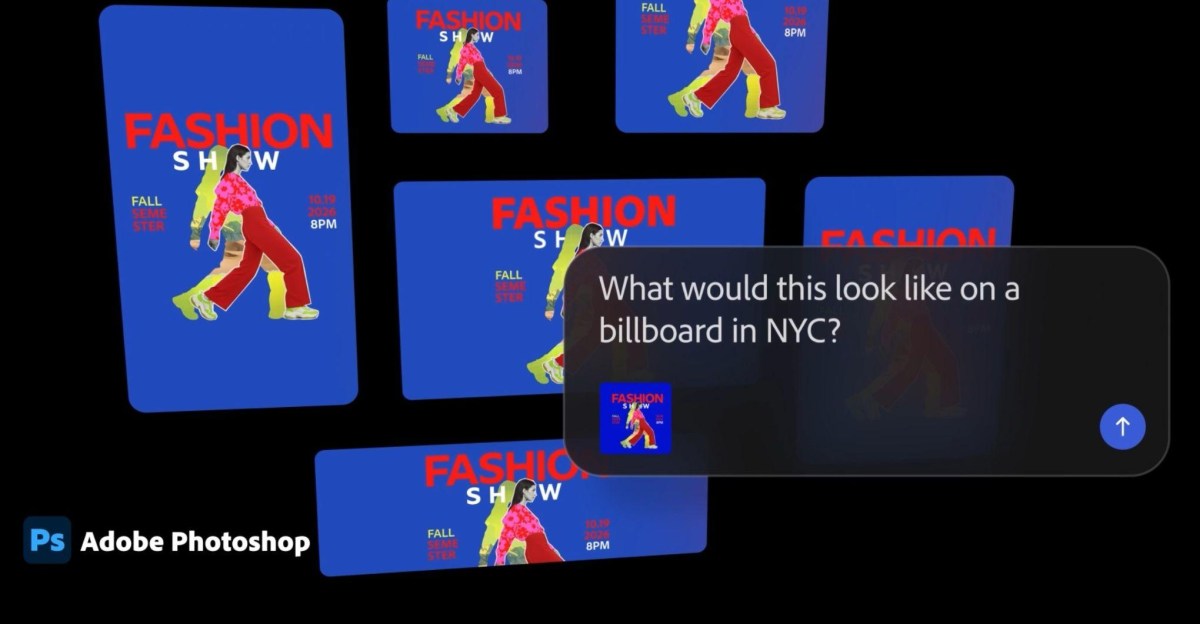
Adobe’s plan to stick AI assistants into all of its Creative Cloud suite is now fully underway, with new chatbots now rolling out to its biggest editing and design apps. As part of a public beta launching today, Photoshop, Premiere, Illustrator, InDesign, and Frame.io now each have a bespoke AI Assistant that can be used to organize your work and automate app-specific tasks.

While the AI assistants are all powered by Adobe’s “conversational creative agent,” they work independently and operate “as a specialist” within each Creative Cloud app, according to Adobe’s announcement. That means the Premiere AI assistant is fine-tuned for tasks like quickly reorganizing your video timeline, for example, while Photoshop’s version of the chatbot understands how to use some of its most popular photo editing tools on your behalf.

The AI assistants provide a chatbot-like interface within each app where you can describe what changes you’d like to make to your project in natural language prompts, similar to the assistants that have already rolled out to Adobe Express, Acrobat, and Firefly. The capabilities of each are fairly expansive, as expected for complex design apps, but here’s a rough overview of what each can do:

The AI assistant in Premiere can sort assets into bins, and quickly rename batches of clips based on what’s happening in the footage. It can also identify questions or specific keywords in recorded speech, and use them to add markers to your project timeline, or lay out a working starting point for your video. Adobe says that “the tedious set-up work is taken care of for you,” and that the AI assistant can help with anything you do in the Project panel or Timeline.

For Photoshop, you can “describe the desired outcome,” according to Adobe — a prompt-based approach to editing that we’ve already seen in Adobe’s Firefly assistant. You can use it to organize your layers, switch backgrounds, resize assets for use on online platforms, and more. This desktop app expansion follows Adobe launching an AI assistant for its web and mobile versions of Photoshop earlier this year.

In Illustrator, the AI assistant can support “multi-step production jobs,” such as flagging color mode errors or missing fonts, reorganizing layers, and generating multiple versions of design files from a spreadsheet or document. For Adobe’s InDesign publishing software, the chatbot can apply print-readiness checks and copy and styling updates across every page layout when you upload a new PDF or open an existing template. And in Frame.io, the assistant can surface revision feedback, organize shoot assets, generate B-roll footage, and help with “creative direction” on your projects, according to Adobe.

“Adobe has always been at the center of how the best creative work comes to life, and this is a major expansion of that promise,” said Adobe’s creativity head David Wadhwani. “Every creative now has an agent capable of helping them execute across every app and platform where they work so they can set the vision, apply their taste, and make the calls that only they can.”

Read the full article here

Follow on Google News Follow on Flipboard
Share. Facebook Twitter Pinterest LinkedIn Tumblr Email Copy Link
News Room
  • Website

Related Posts

Apple TV is offering the next F1 Grand Prix for free in the United States – here’s how to watch

June 18, 2026

You can now use the Game Boy Camera with your phone

June 18, 2026

iPhone Air 2 rumoured to resolve our two biggest complaints, but is an Apple sequel even desired?

June 18, 2026
Add A Comment
Leave A Reply Cancel Reply

Top Articles

Best Royal Pop models ranked: these are the Swatch x Audemars Piguet collab watches I’d recommend

May 19, 2026

User-replaceable batteries are coming back in a big way

May 31, 2026

Apple iPhone Air 2: the second version of the super-thin phone will surely fix these two crucial issues

May 14, 2026
Latest Reviews

This Ghost in the Shell keyboard makes me want to activate the hundred spidery robot fingers inside my regular fingers

News RoomJune 18, 2026

Got Thread problems? There’s an app for that

News RoomJune 17, 2026

Apple’s weird anti-nausea dots cured my car sickness

News RoomJune 16, 2026

Subscribe to Updates

Get the latest tech news and updates directly to your inbox.

Demo
Most Popular

Best Apple Watch in 2026: all current models reviewed and rated

May 6, 2026

Best Royal Pop models ranked: these are the Swatch x Audemars Piguet collab watches I’d recommend

May 19, 2026

User-replaceable batteries are coming back in a big way

May 31, 2026
Our Picks

HBO Max’s annual plans are 28 percent off right now

June 18, 2026

Apple confirms fans’ worst fears – RAMageddon price hikes are coming, we just don’t know how bad it’ll be yet

June 18, 2026

This robotic self-driving toilet comes to you

June 18, 2026

Subscribe to Updates

Get the latest tech news and updates directly to your inbox.

Facebook X (Twitter) Instagram Pinterest
  • Home
  • Privacy Policy
  • Terms of use
  • For Advertisers
  • Contact
2026 © Prices.com LLC. All Rights Reserved.

Type above and press Enter to search. Press Esc to cancel.