





Sonos has updated its app for iPhone, which finally returns lock screen controls via the useful Live Activities tool for iOS.
The update comes after a rough patch for iPhone users with Sonos systems where a disastrous relaunch took away or broke a series of trusted features including the ability to control music from the lock screen.
For the last couple of years, Sonos users have lacked the ability to control music playing on their systems via the Sonos app without manually entering the app itself. If you’re playing via Spotify Connect or AirPlay there have been limited controls, but this finally makes the Sonos app worth using again.
The Live Activity shows playback controls and volume controls as well as the name of the track, artist and speaker the track is playing on. Once the display is unlocked the Live Activity drops into the Dynamic Island and can be expanded to show the same options.

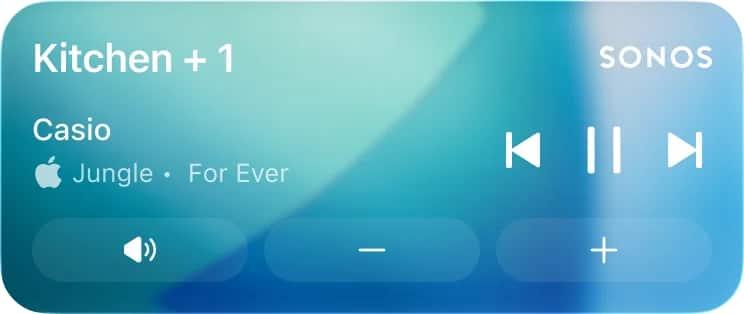


“Once enabled the activity will appear after you initiate playback and then close the app. It will show the current room or group you were last playing audio from. When playback stops, the live activity will disappear after 15 minutes,” Sonos explains on the subreddit.
“While the iOS Live Activity can be viewed from your Lock Screen, you must first unlock your iPhone with Face ID or a Passcode before being able to make playback changes.”
System owners will need to enable the feature via the Account > App Preferences screen. This doesn’t feel like the end for iOS updates with Sonos promising more to come during the iOS 27 lifecycle. It’s possible that could include Siri AI access, but the company is staying mum for now. Sonos also says he’s planning to support album art in Live Activities which doesn’t currently work.
Sonos added: “iOS 27 is coming later this year from Apple and the teams have been exploring the new capabilities it has in Beta. No news to share right now but keep your eyes peeled and ears open!”




Read the full article here


