
Close Menu
Gadget Guide News
  • Home
  • News
  • Features
  • Reviews
  • Best Stuff
  • Buying Guides
  • Deals
  • More Articles

Subscribe to Updates

Get the latest tech news and updates directly to your inbox.

Trending

YouTube now lets you turn off Shorts

April 15, 2026

Microsoft counters the MacBook Neo with freebies for students

April 15, 2026

Google launches a Gemini AI app on Mac

April 15, 2026
Facebook X (Twitter) Instagram
Gadget Guide News
Subscribe
  • Home
  • News
  • Features
  • Reviews
  • Best Stuff
  • Buying Guides
  • Deals
  • More Articles
Gadget Guide News
  • Best Stuff
  • Buying Guides
  • Reviews
  • Deals
  • Features
Home»News»YouTube now lets you turn off Shorts
News

YouTube now lets you turn off Shorts

News RoomBy News RoomApril 15, 2026012 Mins Read
Share Facebook Twitter Pinterest Copy Link LinkedIn Tumblr Email Telegram WhatsApp
Follow Us
Google News Flipboard
Share
Facebook Twitter LinkedIn Pinterest Email Copy Link

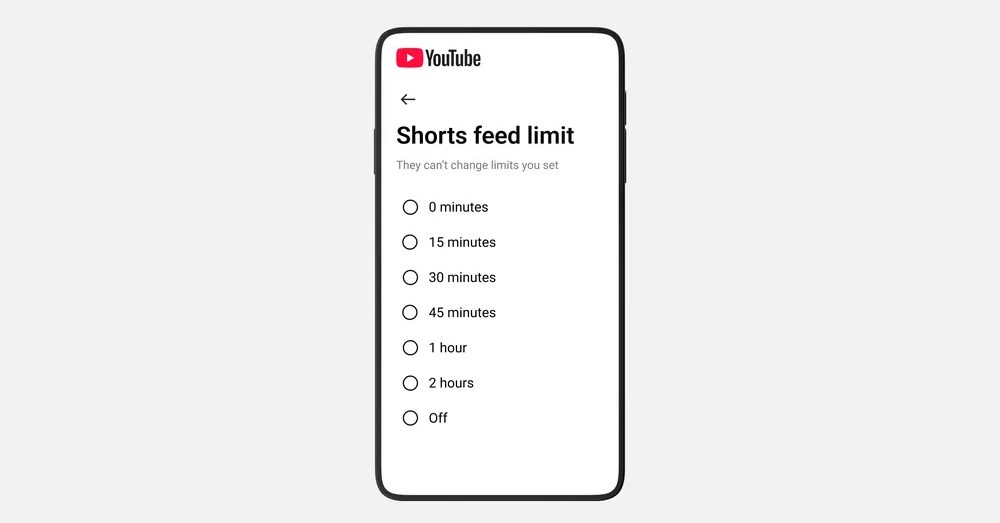
YouTube’s time management settings now have an option to put a zero-minute time limit on Shorts, effectively removing them from your app in Android and iOS. The option is an update to the Shorts timer YouTube originally announced in October; the lowest previous option was 15 minutes.

The feature was expanded in January to give parents some control over how long their kids spend scrolling through Shorts, with an option for zero minutes “coming soon.” According to YouTube spokesperson Makenzie Spiller, the option to set the timer to zero is now “live for all parents, and is currently being rolled out to everyone,” including users with regular adult accounts.

Regardless of age, it can be a handy tool for anyone who wants to spend a little less time scrolling. The Shorts tab won’t show any videos once you hit your limit, just a notification that you’ve “reached your Shorts feed limit.” In our tests, hitting the time limit also removes Shorts from the Home screen, so by setting the timer to zero you can ignore Shorts entirely if you want. To turn on the timer, go to the settings in the YouTube app and select “time management” then toggle on the Shorts feed limit and select a time for it.

Read the full article here

Follow on Google News Follow on Flipboard
Share. Facebook Twitter Pinterest LinkedIn Tumblr Email Copy Link
News Room
  • Website

Related Posts

Microsoft counters the MacBook Neo with freebies for students

April 15, 2026

Google launches a Gemini AI app on Mac

April 15, 2026

Ikea’s Varmblixt smart lamp review: A sweet treat

April 15, 2026
Add A Comment
Leave A Reply Cancel Reply

Top Articles

The best e-reader for 2026

February 20, 2026

Apple’s new MacBook feature stops your battery hitting 100%. Here’s why that could help

February 17, 2026

The next iPhone could borrow a serious trick from professional cameras. Here’s why it could be game-changing

February 24, 2026
Latest Reviews

More phone cameras should come with telephoto lenses

News RoomApril 15, 2026

Insta360’s Snap is a tiny magnetic phone screen for taking rear-camera selfies

News RoomApril 8, 2026

I wish this selfie phone case was better for selfies

News RoomApril 7, 2026

Subscribe to Updates

Get the latest tech news and updates directly to your inbox.

Demo
Most Popular

Star Search is Netflix’s biggest live bet yet

February 16, 2026

The best e-reader for 2026

February 20, 2026

Apple’s new MacBook feature stops your battery hitting 100%. Here’s why that could help

February 17, 2026
Our Picks

Ikea’s Varmblixt smart lamp review: A sweet treat

April 15, 2026

Spotify now sells printed books

April 15, 2026

Snap is laying off 16 percent of its staff as it leans into AI

April 15, 2026

Subscribe to Updates

Get the latest tech news and updates directly to your inbox.

Facebook X (Twitter) Instagram Pinterest
  • Home
  • Privacy Policy
  • Terms of use
  • For Advertisers
  • Contact
2026 © Prices.com LLC. All Rights Reserved.

Type above and press Enter to search. Press Esc to cancel.