
Close Menu
Gadget Guide News
  • Home
  • News
  • Features
  • Reviews
  • Best Stuff
  • Buying Guides
  • Deals
  • More Articles

Subscribe to Updates

Get the latest tech news and updates directly to your inbox.

Trending

Should you stare into Sam Altman’s orb before your next date?

April 17, 2026

Amazon Fire TV devices are officially done with Android

April 17, 2026

The best cheap phones for 2026

April 17, 2026
Facebook X (Twitter) Instagram
Gadget Guide News
Subscribe
  • Home
  • News
  • Features
  • Reviews
  • Best Stuff
  • Buying Guides
  • Deals
  • More Articles
Gadget Guide News
  • Best Stuff
  • Buying Guides
  • Reviews
  • Deals
  • Features
Home»News»Hate signing PDFs as much as I do? This new Chrome feature will save your sanity
News

Hate signing PDFs as much as I do? This new Chrome feature will save your sanity

News RoomBy News RoomFebruary 20, 2026012 Mins Read
Share Facebook Twitter Pinterest Copy Link LinkedIn Tumblr Email Telegram WhatsApp
Follow Us
Google News Flipboard
Share
Facebook Twitter LinkedIn Pinterest Email Copy Link

Dealing with PDF files is one of the banes of my life. From signing contracts and NDAs, to jumping through mortgage forms, the whole process is a mind-numbing slog. 

Download, find an app, sign, send to yourself, find the original email asking you to sign, then attach and send. It’s not much on paper, but life’s full of enough micro annoyances as it is. 

All this ranting to say that finally, there’s an easier way.

Google has announced a smattering of new features for Chrome, one of which is the ability to sign PDF documents directly in the browser. You can also add highlights and written notes directly within the built-in PDF viewer too – all without having to jump through the rigamarole of separate apps or software.

While it’s not designed to compete with heavyweight desktop PDF software, for everyday contracts, school documents, internal reports, and approval forms, staying inside a single tab is an absolute godsend.

Chrome now also offers the option to send a PDF directly to your Google Drive account instead of downloading it locally first. 

When you use it, the file is automatically stored in a specific Drive folder labelled “Saved from Chrome”, making it easier to locate later across devices. 

Anyone who’s ever downloaded something important only to forget where it landed will appreciate that small but practical tweak.
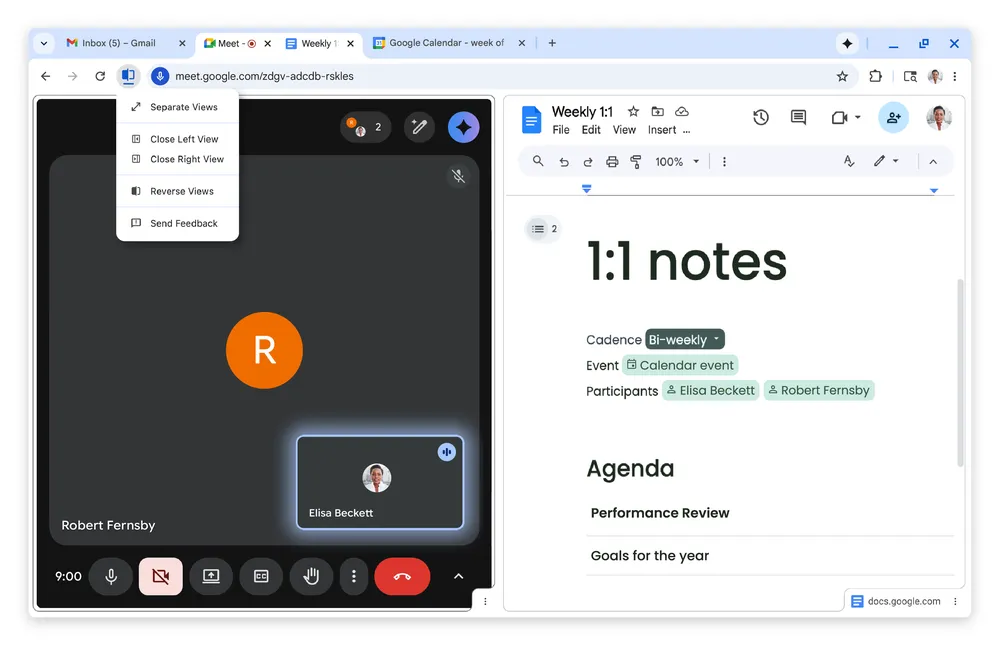
Elsewhere, the new Chrome update also introduces a native Split View feature. Rather than opening two browser windows and arranging them manually, you can now place two tabs side by side within one Chrome window. 

The aim is to keep related tasks visible at the same time – whether that’s referencing notes while drafting an email, checking product specs while comparing prices, or following instructions without constantly switching back and forth.

If your workday mostly happens inside the browser, cutting back on constant tab shuffling could make quite a welcome difference.

I’ll admit that none of this is as mind-blowing as, say, shiny new hardware. But if you’re anything like me, these new features will be very much appreciated all the same.

Read the full article here

Follow on Google News Follow on Flipboard
Share. Facebook Twitter Pinterest LinkedIn Tumblr Email Copy Link
News Room
  • Website

Related Posts

Should you stare into Sam Altman’s orb before your next date?

April 17, 2026

Amazon Fire TV devices are officially done with Android

April 17, 2026

The best cheap phones for 2026

April 17, 2026
Add A Comment
Leave A Reply Cancel Reply

Top Articles

The AI security nightmare is here and it looks suspiciously like lobster

February 19, 2026

The next iPhone could borrow a serious trick from professional cameras. Here’s why it could be game-changing

February 24, 2026

West Virginia sues Apple for allegedly letting child abuse spread in iCloud

February 19, 2026
Latest Reviews

Boox Palma 2 Pro review: an impressive e-ink smartphone – almost

News RoomApril 17, 2026

Asus ROG Swift PG34WCDN review: my new ultrawide gaming monitor sweet spot

News RoomApril 16, 2026

Samsung Galaxy A57 review: this unexciting mid-range phone has barely changed from last year

News RoomApril 16, 2026

Subscribe to Updates

Get the latest tech news and updates directly to your inbox.

Demo
Most Popular

The best e-reader for 2026

February 20, 2026

The AI security nightmare is here and it looks suspiciously like lobster

February 19, 2026

The next iPhone could borrow a serious trick from professional cameras. Here’s why it could be game-changing

February 24, 2026
Our Picks

New Google Pixel Phones models could take a design cue from Nothing

April 17, 2026

Betting on the news raises ethical questions for journalists

April 17, 2026

Boox Palma 2 Pro review: an impressive e-ink smartphone – almost

April 17, 2026

Subscribe to Updates

Get the latest tech news and updates directly to your inbox.

Facebook X (Twitter) Instagram Pinterest
  • Home
  • Privacy Policy
  • Terms of use
  • For Advertisers
  • Contact
2026 © Prices.com LLC. All Rights Reserved.

Type above and press Enter to search. Press Esc to cancel.