
Close Menu
Gadget Guide News
  • Home
  • News
  • Features
  • Reviews
  • Best Stuff
  • Buying Guides
  • Deals
  • More Articles

Subscribe to Updates

Get the latest tech news and updates directly to your inbox.

Trending

I’ve used the Razer Blade 16 (2026) for two weeks – here’s why it’s the gaming laptop I take everywhere

July 17, 2026

How to watch the World Cup final, wherever you are

July 17, 2026

I tested the TentBox Lite XL rooftop tent to see what all the fuss is about – and I now get it

July 17, 2026
Facebook X (Twitter) Instagram
Gadget Guide News
Subscribe
  • Home
  • News
  • Features
  • Reviews
  • Best Stuff
  • Buying Guides
  • Deals
  • More Articles
Gadget Guide News
  • Best Stuff
  • Buying Guides
  • Reviews
  • Deals
  • Features
Home»News»Gemini for Google Home can now use your cameras to trigger automations
News

Gemini for Google Home can now use your cameras to trigger automations

News RoomBy News RoomMay 28, 2026063 Mins Read
Share Facebook Twitter Pinterest Copy Link LinkedIn Tumblr Email Telegram WhatsApp
Follow Us
Google News Flipboard
Share
Facebook Twitter LinkedIn Pinterest Email Copy Link

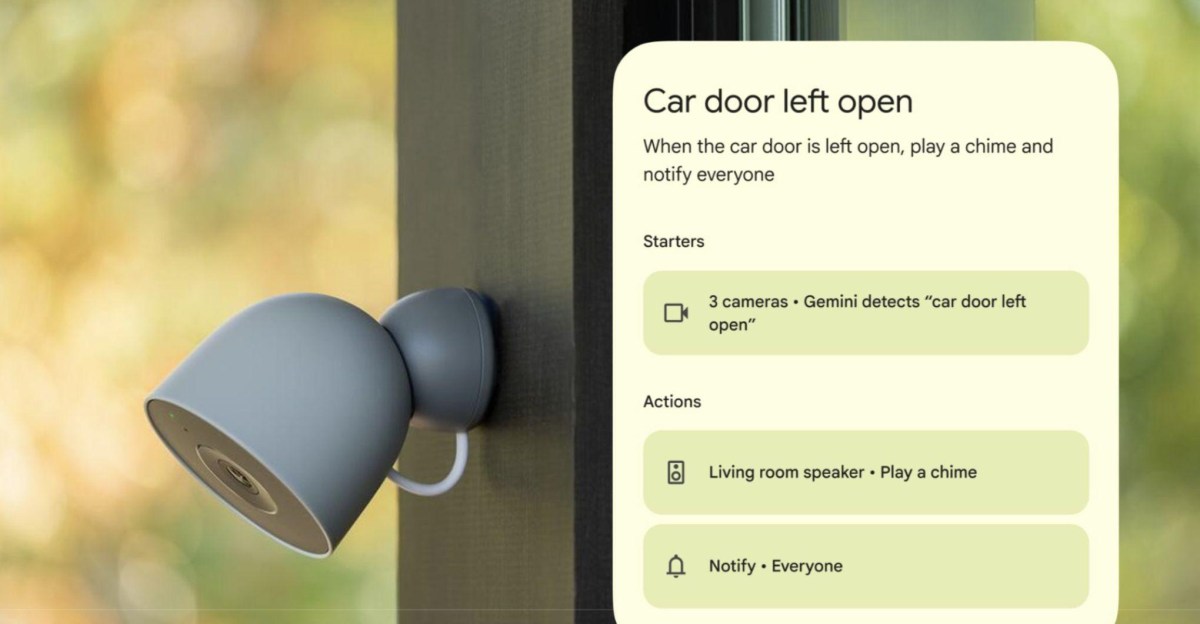
Google Home is rolling out a new Gemini-powered automation feature that can trigger smart home routines based on what your security cameras can see. This is one of several updates announced yesterday for Gemini for Home, including enhanced voice command support and general stability improvements, following its early access launch in October.

“We are introducing a brand-new starter that lets you design automations based on visual insights,” Google said in its announcement. “Because your cameras can now actually understand what they see, your smart home can automatically react to almost anything happening around your home.”

The feature is currently supported for Nest cameras and select third-party cameras with “Gemini Built-In,” and it’s only available in English for US users enrolled in the Google Home Public Preview program for now. You’ll also need to enable AI descriptions for your cameras via “Gemini for Home camera features,” and be subscribed to the Google Home Premium Advanced plan ($20 per month or $200 per year).

To set up the feature, Google says you can simply describe the exact event you want to trigger an automation for using natural language, and then select which cameras inside or outside of your home should look for it. Google recommends you describe objects that are clearly visible to your cameras and says the camera “needs a brief moment to process what it sees,” and so this shouldn’t be used for “instant alerts, time-sensitive situations, or security and safety purposes.”

For example, you can ask Gemini for Home to look for “raccoons near the trash bins” to then trigger a routine that turns on security lighting to scare them off, or tell it to notify you when it detects that mail has been delivered. You can also ask it to look for “red BMW enters driveway” or for specific people (provided you have the Friendly Faces feature enabled), and then activate routines inside your home, like opening smart blinds or controlling your heating system.

Google also announced that Gemini for Home users can now ask the voice assistant to trigger multiple actions in a single verbal command, such as telling it to lower the blinds, dim the lights, set a 20-minute timer, and start your favorite podcast. Gemini should also now respond more quickly to voice commands and provide more “consistent and predictable” responses to natural language commands, such as asking it to make your room lighting “a little warmer.”

Read the full article here

Follow on Google News Follow on Flipboard
Share. Facebook Twitter Pinterest LinkedIn Tumblr Email Copy Link
News Room
  • Website

Related Posts

I’ve used the Razer Blade 16 (2026) for two weeks – here’s why it’s the gaming laptop I take everywhere

July 17, 2026

OnePlus is dead in the US. Did it ever have a chance?

July 16, 2026

Claude can now use your 1Password credentials for you

July 16, 2026
Add A Comment
Leave A Reply Cancel Reply

Top Articles

User-replaceable batteries are coming back in a big way

May 31, 2026

I think the BYD Ti7 offers way better value than a Land Rover Defender – but is it as good as one?

June 2, 2026

The best paid-for iPhone and iPad apps money can buy

June 1, 2026
Latest Reviews

8BitDo’s FlipPad is the most pocketable way to turn your phone into a Game Boy

News RoomJuly 15, 2026

Siri AI is already changing how I use my iPhone

News RoomJuly 13, 2026

Siri AI makes the Apple Watch finally feel like a wrist computer

News RoomJuly 13, 2026

Subscribe to Updates

Get the latest tech news and updates directly to your inbox.

Demo
Most Popular

Best Royal Pop models ranked: these are the Swatch x Audemars Piguet collab watches I’d recommend

May 19, 2026

User-replaceable batteries are coming back in a big way

May 31, 2026

I think the BYD Ti7 offers way better value than a Land Rover Defender – but is it as good as one?

June 2, 2026
Our Picks

12 rugged adventure watches to wear on your next expedition, from the Rolex Explorer to the Hamilton Khaki Field

July 17, 2026

OnePlus is dead in the US. Did it ever have a chance?

July 16, 2026

Claude can now use your 1Password credentials for you

July 16, 2026

Subscribe to Updates

Get the latest tech news and updates directly to your inbox.

Facebook X (Twitter) Instagram Pinterest
  • Home
  • Privacy Policy
  • Terms of use
  • For Advertisers
  • Contact
2026 © Prices.com LLC. All Rights Reserved.

Type above and press Enter to search. Press Esc to cancel.