
Close Menu
Gadget Guide News
  • Home
  • News
  • Features
  • Reviews
  • Best Stuff
  • Buying Guides
  • Deals
  • More Articles

Subscribe to Updates

Get the latest tech news and updates directly to your inbox.

Trending

I’ve used the Razer Blade 16 (2026) for two weeks – here’s why it’s the gaming laptop I take everywhere

July 17, 2026

How to watch the World Cup final, wherever you are

July 17, 2026

I tested the TentBox Lite XL rooftop tent to see what all the fuss is about – and I now get it

July 17, 2026
Facebook X (Twitter) Instagram
Gadget Guide News
Subscribe
  • Home
  • News
  • Features
  • Reviews
  • Best Stuff
  • Buying Guides
  • Deals
  • More Articles
Gadget Guide News
  • Best Stuff
  • Buying Guides
  • Reviews
  • Deals
  • Features
Home»News»You can print, slice, and engrave using this desktop crafting machine
News

You can print, slice, and engrave using this desktop crafting machine

News RoomBy News RoomMay 27, 2026082 Mins Read
Share Facebook Twitter Pinterest Copy Link LinkedIn Tumblr Email Telegram WhatsApp
Follow Us
Google News Flipboard
Share
Facebook Twitter LinkedIn Pinterest Email Copy Link

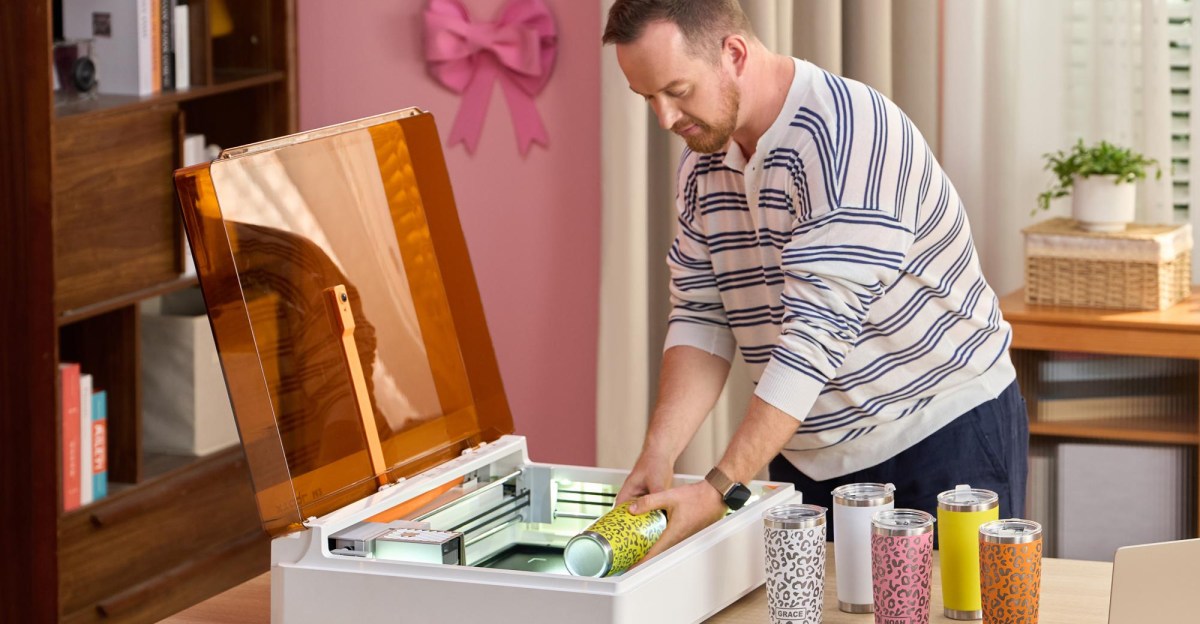
xTool has announced a new multi-purpose crafting machine that could potentially be one of the most affordable ways to start an Etsy shop. Its modular design facilitates a CMYK print head that works on multiple materials including paper, wood, and felt. It can later be swapped with laser-based cutting and engraving tools. You can use the M2 to both print and cut stickers, for example, but it’s versatile enough to also be used to etch designs onto metal water bottles. The machine’s upgradeable functionality justifies its footprint, which is much larger than your typical desktop printer.

The xTool M2 Color Craft Laser, which will be priced at $599, is available starting today, temporarily discounted to $549 for the first week. However, that base price only gets you a version of the machine with a 10W laser diode capable of cutting over 300 thinner materials. If you also want to print, you’ll need the more expensive $749 bundle that includes the CMYK Inkjet Printing Module, which can churn out about 400 pages before a new ink cartridge is needed. For printing and cutting thicker materials, an $1,149 bundle with a 20W laser is needed, while for an extra $499 you can add an infrared laser module that’s even better at engraving metals.

What really sets the M2 apart from the M1 Ultra, an earlier entry-level version of this crafting machine, is the addition of a 5-megapixel panoramic camera and a 2-megapixel close-up inside the new model. These cameras photograph the material you place inside the machine so you can accurately position designs and cutting patterns using the xTool Studio desktop software. To make the process even easier for novices, the M2 leverages AI to detect the type of materials inserted and automatically adjust the settings for cutting, engraving, or just scoring to make thinner materials easier to flex and fold.

More powerful laser cutters often need to be paired with external air pumps and filtration systems. While the M2 has its own integrated air pump, the exhaust is simply pumped out into a room. If you’re regularly doing a lot of cutting, xTool recommends pairing the M2 with an accessory like its SafetyPro AP2 Air Purifier, but at $999 it’s more expensive than the crafting machine itself.

Read the full article here

Follow on Google News Follow on Flipboard
Share. Facebook Twitter Pinterest LinkedIn Tumblr Email Copy Link
News Room
  • Website

Related Posts

I’ve used the Razer Blade 16 (2026) for two weeks – here’s why it’s the gaming laptop I take everywhere

July 17, 2026

OnePlus is dead in the US. Did it ever have a chance?

July 16, 2026

Claude can now use your 1Password credentials for you

July 16, 2026
Add A Comment
Leave A Reply Cancel Reply

Top Articles

User-replaceable batteries are coming back in a big way

May 31, 2026

I think the BYD Ti7 offers way better value than a Land Rover Defender – but is it as good as one?

June 2, 2026

The best paid-for iPhone and iPad apps money can buy

June 1, 2026
Latest Reviews

8BitDo’s FlipPad is the most pocketable way to turn your phone into a Game Boy

News RoomJuly 15, 2026

Siri AI is already changing how I use my iPhone

News RoomJuly 13, 2026

Siri AI makes the Apple Watch finally feel like a wrist computer

News RoomJuly 13, 2026

Subscribe to Updates

Get the latest tech news and updates directly to your inbox.

Demo
Most Popular

Best Royal Pop models ranked: these are the Swatch x Audemars Piguet collab watches I’d recommend

May 19, 2026

User-replaceable batteries are coming back in a big way

May 31, 2026

I think the BYD Ti7 offers way better value than a Land Rover Defender – but is it as good as one?

June 2, 2026
Our Picks

12 rugged adventure watches to wear on your next expedition, from the Rolex Explorer to the Hamilton Khaki Field

July 17, 2026

OnePlus is dead in the US. Did it ever have a chance?

July 16, 2026

Claude can now use your 1Password credentials for you

July 16, 2026

Subscribe to Updates

Get the latest tech news and updates directly to your inbox.

Facebook X (Twitter) Instagram Pinterest
  • Home
  • Privacy Policy
  • Terms of use
  • For Advertisers
  • Contact
2026 © Prices.com LLC. All Rights Reserved.

Type above and press Enter to search. Press Esc to cancel.